
While I was looking around at basketball data during the course of the project I saw that Basketball-Reference.com had a few pieces of data I wanted to pick up: a player’s shooting arm (right or left) and their high school ranking. The site is also packed with a ton of other data I may use in the future such as a player’s shooting percentage from different distances from the basket. So I thought it would be good to create a procedure to scrape it.
The site use a particular website address structure that makes it easy to scrape: http://www.basketball-reference.com/players + the first letter of the player’s last name + the first 5 letters of the player’s last name (unless the player’s name is less than 5 letters in which case their whole name is used + the first two letters of their first name + a page number (usually a 1, but sometimes a 2 if more than one player share a name). For instance, http://www.basketball-reference.com/players/a/anthoca01.html.
R reads the page source and again the site uses a structured page profile:
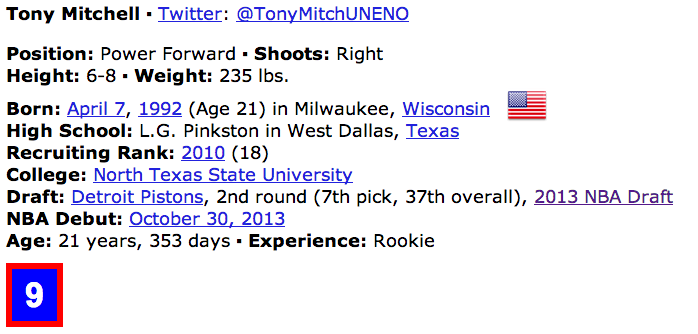
I first used grep to locate the line of the page source that contained “Shoots:” and “Recruiting Rank:.” And then used regular expressions to strip the information out. Not all players have both (or either) set of information so I used a try() wrapper so the code could practice through errors resulting from no match to the regular expressions.
library(stringr)

# Read in master player list
players.DF <- read.csv(file="~/.../All Drafted Players 2013-2003.csv")
allPlayers <- players.DF[,3]

# Convert names to proper format
allPlayers <- str_replace_all(allPlayers, "[[:punct:]]", "")
allPlayers <- tolower(allPlayers)
first <- str_extract(allPlayers,"^[^ ]+")
first <- substring(first,1,2)
last <- str_extract(allPlayers,"[^ ]+$")
last <- substring(last,1,5)
letter <- substring(last,1,1)

shootsVector <- rep(NA,length(allPlayers))
recruitVector <- rep(NA,length(allPlayers))

# Scrape the site and record shooting arm and HSranking
for(i in 1:20) {
  page <- read.csv(paste0(
  'http://www.basketball-reference.com/players/',letter[i],'/',last[i],first[i],'01.html'))

  line <- grep("[Ss]hoots:(.*)Right|Left", page[,], value = FALSE, perl = TRUE)
  index <- regexpr("[Rr]ight|[Ll]eft",page[line,])
  shoots <- substr(page[line,], index, index + attr(index,"match.length") - 1)
  result <- try(shootsVector[i] <- shoots)
  if(class(result) == "try-error") { next; }

  line <- grep("Recruiting Rank:(.*)([0-9]+)", page[,], value = FALSE, perl = TRUE)
  index <- regexpr("\\([0-9]+\\)$",page[line,])
  recruit <- substr(page[line,], index + 1, index + attr(index,"match.length") - 2)
  result <- try(recruitVector[i] <- recruit)
  if(class(result) == "try-error") { next; }

  print(shoots)
  print(recruit)
}

# Combine information
players.DF <- cbind(players.DF, shootsVector,recruitVector)
setnames(players.DF,c("shootsVector","recruitVector"),c("Shooting Arm","HS Ranking"))
write.csv(players.DF,file="~/...Combined Data/Combined Data 1.csv")
The procedure is vulnerable to duplicates. There are ways to deal with it in code. One way would be to also read the college from the page source and use that to pick out the player. In this case, however, after running a duplicates report only 3 duplicates were found.
> which(duplicated(allPlayers))
[1]  715  732 1118
> allPlayers[715]
[1] "tony mitchell"
> allPlayers[732]
[1] "chris wright"
> allPlayers[1118]
[1] "jamar smith"
For that reason, it was much easier to just do a manual search on the 6 players and update their data. I choose to do this in Excel. Using the highlight duplicates feature, I could easily scroll down and find the 3 duplicate players and change their shooting arm and HS ranking as necessary.

 James McCammon