Why are there so many ball commercials?

It started with this Verizon commercial.

Then T-mobile jumped in.

And so did Sprint.

I’m curious why T-mobile and Sprint thought THIS was the commercial that was going to take down their brand unless they responded. Did they think it was destructively creative or effective? Was there a mass exodus of customers?

Having worked for a bit in the marketing space I doubt this decision was based in data. It would have required a quite effective large company. The analysts would have had to see a drop in customer renewal or spike in abandonment, identified the fact that the discontinuity started when the Verizon ball commercial first aired, and passed this information along to the marketing team, which actually decided to do something with the data. Even so the marketing team would have had to work with creative and would have had to decide to produce essentially the same commercial as Verizon. More likely the marketing team itself or an executive somewhere near the top of the company saw the commercial, thought the claims didn’t tell the whole story or became especially concerned about the commercial, and ordered some sort of counter-advertising.

I’m also curious about the strategy. It’s hard to believe T-mobile and Sprint were actually trying to “set the record straight” by mimicking the ball commercials. David Ogilvy, in Ogilvy on Advertising, mentioned in the early 1980s that research already showed an advertisement mentioning both the company’s name and the name of a competitor was ineffective because as time passed customers forgot which company the advertisement promoted. I’ve always assumed this is why commercials so often say, “Tide removes stains better than the next leading brand,” rather than mentioning the name of that other brand. Of course, some commercials do mention competitors by name, which makes me curious about the state of research over the 30 years since Ogilvy’s book first made its appearance.

At any rate, a more probable model in this instance is that T-mobile and Sprint were intentionally mudding the waters by using similar graphics and iconography specifically to confuse the matter. Customers no longer associated a commercial with colored balls rolling down a chute with Verizon’s superiority, but with a confusing mess of claims and counterclaims by all three national providers. The best action for customers becomes staying the course–customers might not migrate from Verizon to, say, T-mobile, but at least they wouldn’t migrate in the opposite direction either.

One possible flaw in the strategy is that by the time T-mobile and Sprint produced and aired the commercials the damage was already done. It allowed Verizon to pivot its creative leaving the impression that T-mobile and Sprint were talking to air.

On Life and Lyft

Driving for Lyft before I start a new job. Here are a few thoughts:

3 ways Google Maps fails

  • When there is short-term construction that closes a road.
  • When roads are layered on top of one another, for example a viaduct running atop a ground-level artery.
  • When it needs to know where the front door is. Is the front door on the street side or the alley side of a skyscraper? Google doesn’t seem to know. Just today it wanted me to take the freeway onramp and then stop so I could let a passenger out at the Seattle Facebook office.

Computer chess, presentation of self, and the best way to get to work

Everyone has a preferred way to get to work in the morning. They sometimes have preferred ways to get to bars and the such, but there is something special about getting to work in the best, most creative way possible. There is usually a “secret” route or “shortcut.” This is sometimes presented passive-aggressively as we in Seattle are famous for being: “Now, when I drive I turn right here and then make an illegal u-turn. But I don’t have my drivers do that.” Sooooo…I should make the illegal u-turn right?

I was talking to a passenger and told him about the preferred route everyone had to work and how I would sometimes overhear them telling their friend about how much faster their way was than a coworkers’. He said, “It’s like they take pride in it.” Exactly. More and more I think most of our behavior is signaling. I’m currently reading The Presentation of Self in Everyday Life. Performances are very much on display even in the short trip to work in the back of a stranger’s car.

Their “special” directions often override Google Maps (I keep the speaker on so they can hear the directions it’s telling me). They say, “I don’t know why it’s telling you to go that way, you should turn left here.” I do and it’s always slower. It reminds me of Tyler Cowen’s thoughts on computer-human chess. A computer-human combination can beat a computer alone, but the trick is to almost always defer to the computer. Likewise, Google Maps isn’t perfect, but 9 times out of 10 I’d say it’s faster than your secret “shortcut.” For one thing it knows about dynamic traffic conditions. It’s also, you know, a computer so it’s designed to make calculations about getting you from point A to B that aren’t biased by your competition with your coworker about who has the best route to work. I mean, just think about how much data Google Maps must have. Every time you use it you’re loading it with more information about how long it took you to get from Cherry Street to Spring Street on a certain day at a certain time in certain weather conditions. It basically has infinite data on driving routes in every major U.S. city.

Seeing the city through others’ eyes

“You have to turn right. You see if you go straight the road turns into 2nd Avenue Extension, but if you want to just stay on 2nd Avenue you have to turn right.” He said this with an air of disbelief, trying not to laugh. He told me the streets in Vancouver, Canada make more sense. It helps to know about the history of Seattle. It struck me that street creation in Seattle was a bit Hayek, planned in the short term, but emergent over the long term.

A young man visiting from Salt Lake said the air was too polluted. He loves the rain in Seattle.

I drove two men to the Woodland Park Zoo. They had come for a work trip and stayed an extra weekend. They told me they had made it a habit of visiting zoos wherever they traveled.

Surprises

I did not anticipate how much my butt would hurt. Like really hurt. But I guess I’m surprised that I’m surprised since I should have anticipated that sitting down all day would hurt my butt. Also surprising how fast a cell phone battery runs out when constantly using Lyft and Google Maps apps. And I’m surprised by how much time I spend alone. It seems like well over half the day is spent driving around looking for passengers. When I finally find someone it’s like “Thank God!” I don’t have to be alone anymore.

People are good

I’ll never understand Misanthropes. I’ve used online dating sites to go on 50+ first dates and have now given 150 Lyft rides. A small sample in the grand scheme of things, but I suspect a much richer sample than those that fear the downfall of society. Maybe the only things I’ve learned for sure is that people are good. Or even more fundamentally, people are just trying to carve out a living in this crazy world. Some are happy to sit quietly or check email, but many want to engage and learn. Interacting so often makes me feel apart of the world more richly and deeply than I had anticipated (perhaps this should have gone under surprises).

Actually, about 15+% of the time I want to keep hanging out with the person I’m driving and get a little sad I have to drop them off. I want to be like, “Hey…can I come eat dinner with you guys?”

Surge pricing

If supply doesn’t match demand surge pricing is invoked for the passenger. I’ve seen it go up to 200% of a normal fare. This is indicated in the Lyft driver app by a heat map overlaid on the portions of the city where surge pricing is currently in effect. It seems to work much more on the demand side than the supply side. That is, passengers just don’t want to pay the fare so they don’t request a car. In economic theory it’s also meant to send a signal to producers – in this case cars – to “produce” more (drive to that area). However, often the surge pricing is only in effect for a few minutes, or even a few seconds. It reminds me of that line from Pirates of the Caribbean about Isla de Muerta, which can only be found by those that already know where it is. You can only take advantage of surge pricing if you’re already in the area where surge pricing is in effect. Don’t try to drive to it because you won’t make it. As Wayne Gretzky said, “Skate to where the puck is going, not to where it is.” About 150 rides in and I have yet to pick up a passenger that was paying a surge pricing fare.

Perks

Driving allows a flexible schedule so I can take a few hours on a sunny afternoon off if I want to read about sociology in the park, study Real Analysis or Computational Finance, or watch the latest season of the Americans.

Pay

Everyone wants to know about pay. The pay isn’t that great so I’m finding I don’t really have time to do any of those things I just mentioned. The key is to try to keep people in your car. That’s when you can consistently make $20-$25 per hour. But that’s easier said than done.

Change of Integral Limits for Even Functions

For fun I’m enrolled in an online computational finance certificate at UW. In one of my homework problems I wanted to use the following fact about the integral of single variable, even functions:

\int_{-\infty}^{-x} f(s)ds = \int_{x}^{\infty} f(s)ds

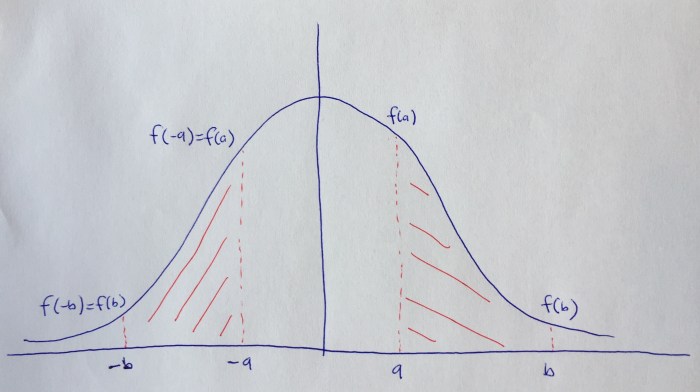
If it’s been a few years since you’ve taken calculus that may not make much sense, but trust me when I tell you that it’s analytically obvious, especially when looking at functions graphically, as this terrible hand drawn image shows:

FullSizeRender (1)

Intuitively, we know the two red areas are the same, so it seems we should be able to interchange the limits as I described above. Indeed, playing around in Mathematica suggests that this is true. However, I could not find a proof or theorem for this online so perhaps it is rarely used. I decided to prove it myself:

Original equation:
\int_{s=-\infty}^{s=-x} f(s)ds

Use u-substitution with -u=s and -du=ds :
= \int_{u=\infty}^{u=x} -f(-u)du

Bring minus sign outside integral:
= -\int_{u=\infty}^{u=x} f(-u)du

Use the fact that -\int_{b}^{a} f(x)dx = \int_{a}^{b} f(x)dx :
= \int_{u=x}^{u=\infty} f(-u)du

By assumption f is even so f(-u)=f(u) :
= \int_{u=x}^{u=\infty} f(u)du

Rewrite improper integral:
= \lim_{t \to \infty} \int_{x}^{t} f(u)du

By Fundamental Theorem of Calculus:
= \lim_{t \to \infty} [F(t)] - F(x)

By Fundamental Theorem of Calculus:
= \lim_{t \to \infty} \int_{x}^{t} f(s)ds

= \int_{x}^{\infty} f(s)ds
Which is exactly the result we were trying to obtain.

One-Sentence Summaries

Here are reviews for the month of November.

1. Man in the High Castle
Didn’t see the sci-fi element coming.

2. Jessica Jones
Spending a few dollars on headphones is worth the investment.

3. Elon Musk by Ashlee Vance
Steve Jobs 2.0.

4. Outliers by Malcolm Gladwell
Pushes the outlier model from the luck of talent to the luck of circumstance.

5. The Sports Gene by David Epstein
Sometimes genes matter…a lot.

6. Modern Romance by Aziz Ansari and Eric Klinenberg
Love is both hard and beautiful.

7. Master of None by Aziz Ansari and Alan Yang
Love is both beautiful and hard.

8. Open by Andre Agassi biography
Life imitates tennis.

9. Red Oaks
Not quite Wonder Years or My So-called Life or even Freaks and Geeks or Skins, but entertaining, easy to watch, and predictable in an endearing way.

10. Between the World and Me by Ta-Nehisi Coates
Boyz n the Hood meets Foucault (the best – and most beautifully written – introduction to critical studies I’ve come across).

11. Homeland
Season 4 tho!

12. Shameless (US Version)
Starting Season 3. A bit uneven; headed the way of Californication in the way it toys with the audience and doesn’t have the patience to give the characters some stability for even part of an episode. Has some good moments though, worth giving a shot.

13. The Inexplicable Universe: Unsolved Mysteries by Neil deGrasse Tyson
We might actually be from Mars. Like really.

Geography Practice

I decided I wanted to get better at geography and I found some quizzes online to help me practice. After a few weeks of practice I’m now able to find the location of every country on earth (video screen capture). Next up: (1) capitols (2) being able to draw and the location of every country from scratch with it’s rough shape, correct bordering countries, and correct country spelling. Then I’m going to memorize other important geographic entities such as lakes, rivers, and mountains. With my current plan I should be finished by the end of this year.

One-Sentence Summaries

1. Steve Jobs by Walter Isaacson
Intuition > Data; cry as much as you want; demand the best out of people.

2. Kitchen Confidential: Adventures in the Culinary Underbelly by Anthony Bourdain
America’s best restaurants rely on a pro-Ecuadorian immigration policy.

3. What Is Strategy? by Michael E. Porter (C. Roland Christensen Professor of Business Administration, Harvard Business School)
Don’t do things better, anyone can do that; do things differently.

4. Paddington
Wes Anderson meets Being There with a sprinkling of The Adventures of Tin Tin guest starring Cruella de Vil as Ethan Hunt. Plus a bear.

5. The Boys in the Boat: Nine Americans and Their Epic Quest for Gold at the 1936 Berlin Olympics by Daniel James Brown
Mind in boat.

6. Malcolm X: The Last Speeches by Malcolm X
Militancy in a time America was militant.

7. Into Thin Air by Jon Krakauer
Socialization can make you a killer.

8. Seattle Children’s Theatre’s Robin Hood.
Kids love when grown men get hit in the butt with swords.

9. American Snipper by Chris Kyle
War vignettes.

What I’m Reading

Just finished:
1. Steve Jobs by Walter Isaacson

2. Kitchen Confidential: Adventures in the Culinary Underbelly by Anthony Bourdain

3. What Is Strategy? by Michael E. Porter (C. Roland Christensen Professor of Business Administration, Harvard Business School)

Up next:
The Boys in the Boat: Nine Americans and Their Epic Quest for Gold at the 1936 Berlin Olympics by Daniel James Brown

In the queue:
1. American Sniper: The Autobiography of the Most Lethal Sniper in U.S. Military History by Chris Kyle, Scott McEwan, Jim DeFelice

2. A Short History of Nearly Everything by Bill Bryson

3. A Passage to India by E. M. Forster

4. Classic Love Poems by William Shakespeare, Edgar Allan Poe, Elizabeth Barrett Browning

5. How Google Works by Eric Schmidt, Jonathan Rosenberg, Alan Eagle

6. Fahrenheit 451 by Ray Bradbury

7. Warren Buffett and the Interpretation of Financial Statements: The Search for the Company with a Durable Competitive Advantage by Mary Buffett, David Clark

8. How to Read and Understand Shakespeare by The Great Courses

9. Into Thin Air by Jon Krakauer

10. Malcolm X: The Last Speeches by Malcolm X

11. Cary Grant Radio Movies Collection by Lux Radio Theatre, Screen Director’s Playhouse

12. Murder on the Orient Express: A Hercule Poirot Mystery by Agatha Christie

13. Age of Ambition: Chasing Fortune, Truth, and Faith in the New China by Evan Osnos

14. Race Matters by Cornel West

15. The Everything Store: Jeff Bezos and the Age of Amazon by Brad Stone

Creating “Tidy” Web Traffic Data in R

There are many tutorials for transforming data using R, but I wanted to demonstrate how you might create dummy web traffic data and then make it tidy ( have one row for every observation) so that it can be further processed using statistical modeling.

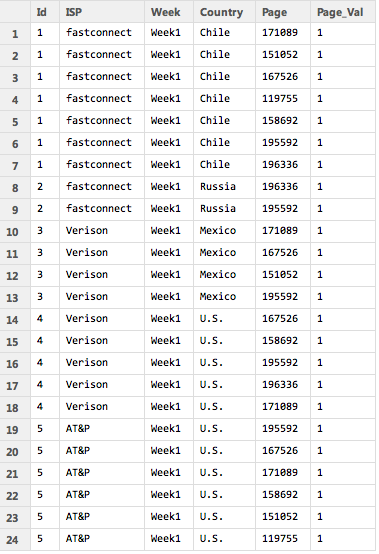
The sample data I created looks like the table below. So there is a separate line for each ID. This might be a visitor ID or a session ID. The ISP, week, and country are the same for every row of the ID. But the page ID is different. If the user visited five different pages they would have five unique rows. Two pages, two rows. And so on. You can imagine many different scenarios where you might have a dataset structured in this way. The column “Page_Val” is a custom column that must be added to the dataset by the user. When we pivot the data each page ID will become it’s own column. If a user visited a particular page Page-Val will be used to add a 1 to that page ID column for that user. Otherwise an NA will appear. We can then go back and replace all the NAs with 0s. I used two lines of code to perform the transformation and replacing of NAs with 0s, but using the fill parameter in the dcast function in “reshape2” it can actually be done in a single line. That’s why it pays to read the documentation very closely, which I didn’t do the first time around. Shame on me.

Screen Shot 2015-03-23 at 6.56.45 PM

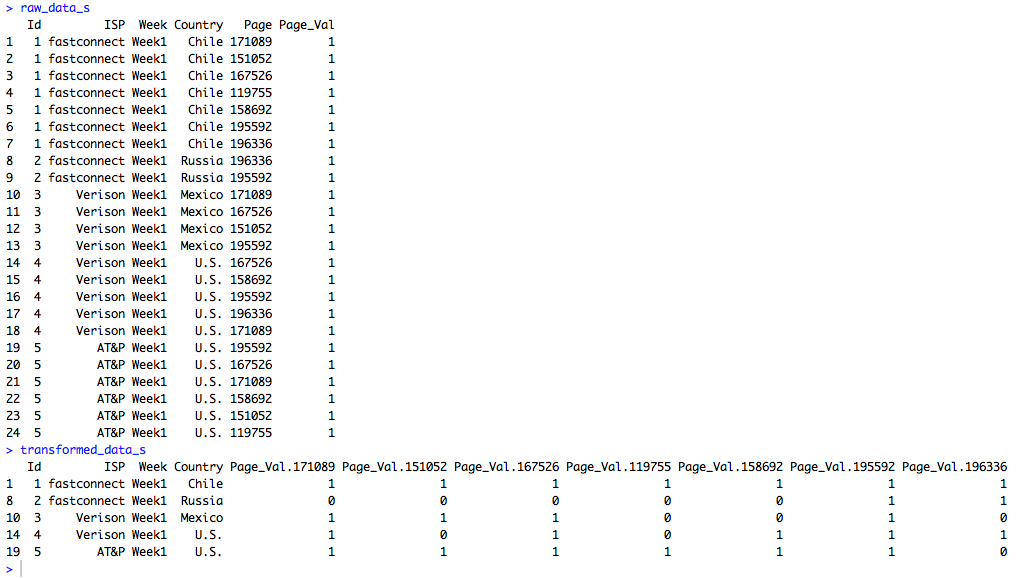
Because the sample data is so small the data can easily be printed out to the screen before and after the transformation.

Screen Shot 2015-03-23 at 7.11.06 PM

But the data doesn’t have to be small. In fact, I wrote a custom R function that generates this dummy data. It can easily produce large amounts of dummy data so more robust excercises can be performed. For instance, I produced 1.5 million rows of data in just a couple of seconds and then ran speed tests using the standard reshape function in one trial and the dcast function from “reshape2” in another trial. The dcast function was about 15 times faster in transforming the data. All of the R code is below.

###############################################################################################
# James McCammon
# Wed, 18 March 2015
#
# File Description:
# This file demonstrates how to transform dummy website data from long to wide format.
# The dummy data is strucutred so that there are mulitple rows for each visit, with 
# each visit row containing a unique page id representing a different webpage viewed
# in that visit. The goal is to transform the data so that each visit is a single row,
# with webpage ids transformed into columns names with 1s and 0s as values representing 
# whether  the page was viewed in that particular visit. This file demonstrates two different
# methods to accomplish this task. It also performs a speed test to determine which
# of the two methods is faster.
###############################################################################################
 
# Install packages if necessary
needed_packages = c("reshape2", "norm")
new_packages = needed_packages[!(needed_packages %in% installed.packages()[,"Package"])]
if(length(new_packages)) install.packages(new.packages)
 
###############################################################################################
# Create small amount of raw dummy data
###############################################################################################
# Make a function to create dummy data
get_raw_data = function(num_visitors, n, ids, isps, weeks, countries, pages) {
  raw_data = cbind.data.frame(
    'Id' = do.call(rep, list(x=ids, times=n)),
    'ISP' = isps[do.call(rep, list(x=sample(1:length(isps), size=num_visitors, replace=TRUE), times=n))],
    'Week' = weeks[do.call(rep, list(x=sample(1:length(weeks), size=num_visitors, replace=TRUE), times=n))],
    'Country' = countries[do.call(rep, list(x=sample(1:length(countries), size=num_visitors, replace=TRUE), times=n))],
    'Page' = unlist(sapply(n, FUN=function(i) sample(pages, i))),
    'Page_Val' = rep(1, times=sum(n)))
  raw_data
}
 
# Set sample parameters to draw from when creating dummy raw data
num_visitors = 5
max_row_size = 7
ids = 1:num_visitors
isps = c('Digiserve', 'Combad', 'AT&P', 'Verison', 'Broadserv', 'fastconnect')
weeks = c('Week1')
countries = c('U.S.', 'Brazil', 'China', 'Canada', 'Mexico', 'Chile', 'Russia')
pages = as.character(sample(100000:200000, size=max_row_size, replace=FALSE))
n = sample(1:max_row_size, size=num_visitors, replace=TRUE)
# Create a small amount of dummy raw data
raw_data_s = get_raw_data(num_visitors, n, ids, isps, weeks, countries, pages)
 
###############################################################################################
# Transform raw data: Method 1
###############################################################################################
# Reshape data
transformed_data_s = reshape(raw_data_s,
                timevar = 'Page',
                idvar = c('Id', 'ISP', 'Week', 'Country'),
                direction='wide')
# Replace NAs with 0
transformed_data_s[is.na(transformed_data_s)] = 0
 
# View the raw and transformed versions of the data
raw_data_s
transformed_data_s
 
###############################################################################################
# Transform raw data: Method 2
###############################################################################################
# Load libraries
require(reshape2)
require(norm)
 
# Transform the data using dcast from the reshape2 package
transformed_data_s = dcast(raw_data_s, Id + ISP + Week + Country ~ Page, value.var='Page_Val')
# Replace NAs using a coding function from the norm package
transformed_data_s = .na.to.snglcode(transformed_data_s, 0)
# An even simpler way of filling in missing data with 0s is to
# specify fill=0 as an argument to dcast.
 
# View the raw and transformed versions of the data
raw_data_s
transformed_data_s
 
###############################################################################################
# Run speed tests on larger data
###############################################################################################
# Caution: This will create a large data object and run several functions that may take a
# while to run on your machine. As a cheat sheet the results of the test are as follows:
# The transformation method that used the standard "reshape" command took 28.3 seconds
# The transformation method that used "dcast" from the "reshape2" package took 1.8 seconds
 
# Set sample parameters to draw from when creating dummy raw data
num_visitors = 100000
max_row_size = 30
ids = 1:num_visitors
pages = as.character(sample(100000:200000, size=max_row_size, replace=FALSE))
n = sample(1:max_row_size, size=num_visitors, replace=TRUE)
# Create a large amount of raw dummy data
raw_data_l = get_raw_data(num_visitors, n, ids, isps, weeks, countries, pages)
 
s1 = system.time({
  transformed_data_l = reshape(raw_data_l,
                               timevar = 'Page',
                               idvar = c('Id', 'ISP', 'Week', 'Country'),
                               direction='wide')
  transformed_data_l[is.na(transformed_data_l)] = 0 
})
 
s2 = system.time({
  transformed_data_l = dcast(raw_data_l, Id + ISP + Week + Country ~ Page, value.var='Page_Val')
  transformed_data_l = .na.to.snglcode(transformed_data_l, 0)   
})
 
s1[3]
s2[3]

Created by Pretty R at inside-R.org

R and C++ Selection Sort

Casually following along with Princton’s Coursera course on algorithms taught in Java. Trying to implement the 5 different sorting algorithms without looking at the Java implementation. At the same time trying to learn a bit of C++ and use R’s Rcpp function.

I implemented selection sort in both R and C++ and boy is the C++ version faster — 1000+ times faster!!! Below you can see a comparison sorting a 50,000 element numeric vector. The C++ version took less than a second, while the R version took 14 minutes. Crazy!!

> unsorted = sample(1:50000)
> R_time = system.time(selection_sort_R(unsorted))
> Cpp_time = system.time(selection_sort_Cpp(unsorted))
> R_time['elapsed']/Cpp_time['elapsed']
 elapsed 
1040.395
> Cpp_time
   user  system elapsed 
   0.82    0.00    0.81 
> R_time
   user  system elapsed 
 838.79    0.09  842.72

Created by Pretty R at inside-R.org

Below are the implementations in R and C++.

###################################################
# R Selection Sort
###################################################
# Define R selection Sort
selection_sort_R = function(v) {
  N = length(v)
 
  for(i in 1:N) {
    min = i
 
    for(j in i:N) {
      if(v[j] < v[min]) {
        min = j
      }    
    }
    temp = v[i]
    v[i] = v[min]
    v[min] = temp
  }
  return(v)
}

Created by Pretty R at inside-R.org

###################################################
# C++ Selection Sort
###################################################
# Define C++ selection Sort
require(Rcpp)
cppFunction('NumericVector selection_sort_Cpp(NumericVector v) {
  int N = v.size();
  int min;
  int temp;
 
  for(int i = 0; i < N; i++) {
    min = i;
 
    for(int j = i; j < N; j++) {
      if(v[j] < v[min]) {
        min = j;
      }    
    }
    temp = v[i];
    v[i] = v[min];
    v[min] = temp;
  }
  return v;
}')

Created by Pretty R at inside-R.org