Will a 16 seed ever beat a 1 seed?

That question arose during a recent dinner with my friend Graham at a popular pizza restaurant in Seattle. Tony Kornheiser of PTI said last week that it will never happen. Graham agrees. I think it will happen in our lifetime. It has almost happened a number of times already.

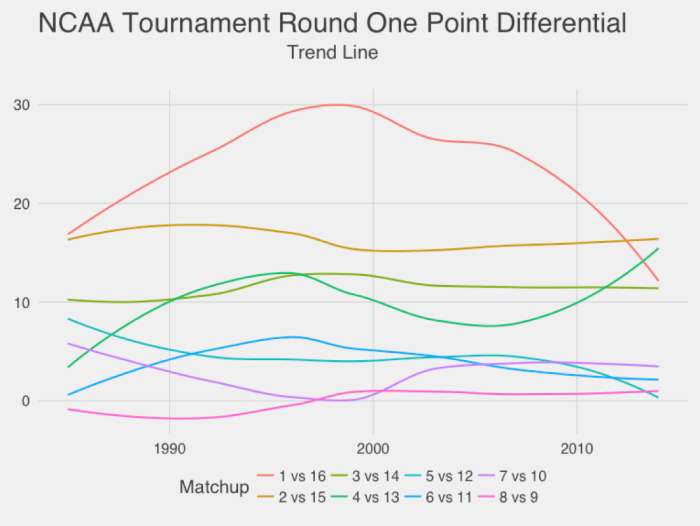
It seemed to me from casual observation like 16 seeds are getting closer to winning on average, but I decided to check this by plotting the point differential of higher-seeded teams during the first round of the NCAA tournament (in the first round there are four 1-vs-16 games). Indeed, compared to many other matchups the 1-vs-16 matchup has shifted greatly over time.

Screen Shot 2016-03-19 at 12.03.18 AM.png

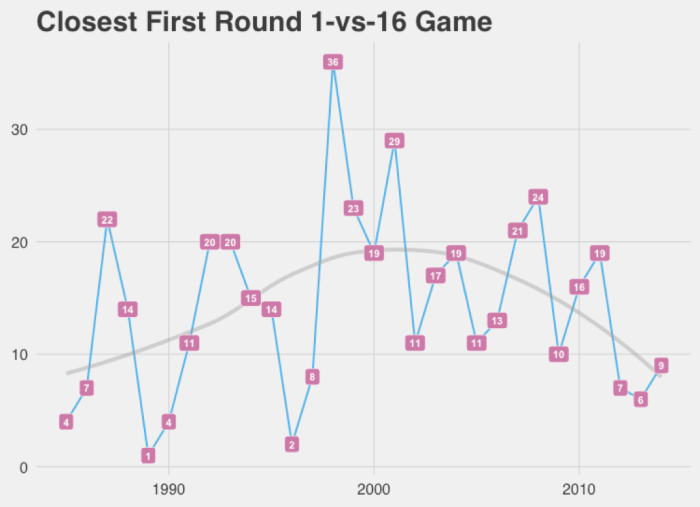
The margin of victory is still substantial, between 10 and 15 points so far this decade, but I remain confident that, let’s say, sometime in the next 40 years it will happen.  There have already been eight 15 seed victories over number 2 seeds and twenty-one 14 seed wins over 3 seeds. The situation looks even better when you consider the closest 1-vs-16 game during each tournament (since we only need one 16 seed to win).

Screen Shot 2016-03-22 at 1.36.38 PM.png

It seems that about two to three times every decade there are relatively close 1-vs-16 games and about once a decade there is an extremely close game (decided by just a couple of points). The 2000s did not fare well for 16 seeds.

I think the outcomes of close games are more stochastic than most. Leadership attribution bias seems to turn these stochastic events into narratives of late-game heroics and we’re prone to say that the 1 seed is more poised and resistant to pressure than players at smaller schools. Of course the history of the tournament has shown us many, many exceptions to this rule (if it’s a rule at all). At tension with this narrative is the story of the underdog that is just happy to be at the tournament and has nothing to lose, playing loose, having fun, and playing “to win” while the nervous champion is playing “not to lose.” So to me many of these games are closer to a coin flip than we like to think and given enough coin flips a tail is bound to come up eventually.

Also, think about it this way: How much difference is there between a 1 seed and a 2 seed, and between a 15 seed and a 16 seed? As you know if you ever watch the tournament seeding show there isn’t much of a difference. The lowest ranked number 1 seed isn’t much better – and could be worse – than some of the number 2 seeds, and eight times has a two seed lost in the first round. Of course you could argue the 2 seeds that lost should have actually been 3 seeds, although this year Michigan State lost as a number 2 seed and many considered them to be a favorite in the entire tournament (by some measures this is the biggest tournament upset ever). The larger point is that seeding is also somewhat stochastic and the question “can a 16 seed beat a 1 seed” is really the question of whether an overmatched team can exhibit a one-time victory over an opponent that is much more dominant on average. And we already know the answer to this question is “yes.”

To give the other side its due, since 1979 when seeding began, 22 of the 37 NCAA Tournament winners have been 1 seeds, so at least some of the top seeds are properly ranked and 16 seeds will have a tough time beating them when ranking is accurate.

It’s also a question as to why the decrease in point margin has occurred. Keep in mind the plot above is just a second-order trend line, although if you plot the underlying year-by-year margin it does follow the trend on average (of course). It’s interesting that the late 1980s and early 1990s was a time of lower point differential for 16-vs-1 games and that this period also correlated with three wins for 2 seeds in the first round (1991, 1993, 1997). Likewise the past few years have seen another decrease in 16-vs-1 game point differential and another string of 2-seed wins, two in 2012 and one each in 2013 and 2016. Similarly, between 1986 and 1999 there were thirteen times that a 14 beat a 3, and since 2010 this has occurred another six times (the intervening years saw only two instances of this in 2005 and 2006). These two periods also correspond to the highly touted recruiting classes of Michigan in 1991 (famously nicknamed the “Fab Five“) and Kentucky’s 2013 “mega class.” It may be that there are episodic shifts in recruiting that systematically leave certain types of talent on the table for smaller schools to cull and develop. (Of course, it may be I’m just seeing patterns where none exist).

My recent memory is that although there are a few good schools that still get the best players, smaller schools have seen that if they recruit good players (particularly good shooters or traditional big men) and play as a team they have a chance at beating anyone in the first rounds and perhaps going deep into the tournament. This increases their confidence and performance. This is another reason I think a 16 seed will eventually beat a 1, because the recent years of the tournament have expanded our imagination of what is possible. Think about the well-known phenomenon of a 12 seed always beating a 5 seed. How nervous do you think 5 seeds are every year? How much of this consistency in a 12 beating a 5 is self-reinforcing and due to the 5 seeds having “the jitters” and the 12 seeds being relatively overconfident?

Creating “Tidy” Web Traffic Data in R

There are many tutorials for transforming data using R, but I wanted to demonstrate how you might create dummy web traffic data and then make it tidy ( have one row for every observation) so that it can be further processed using statistical modeling.

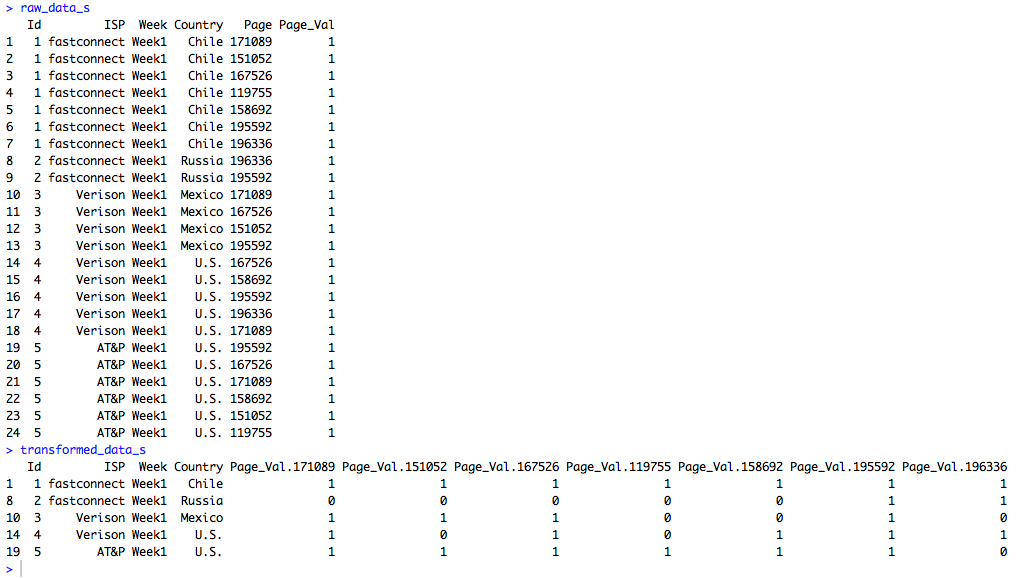
The sample data I created looks like the table below. So there is a separate line for each ID. This might be a visitor ID or a session ID. The ISP, week, and country are the same for every row of the ID. But the page ID is different. If the user visited five different pages they would have five unique rows. Two pages, two rows. And so on. You can imagine many different scenarios where you might have a dataset structured in this way. The column “Page_Val” is a custom column that must be added to the dataset by the user. When we pivot the data each page ID will become it’s own column. If a user visited a particular page Page-Val will be used to add a 1 to that page ID column for that user. Otherwise an NA will appear. We can then go back and replace all the NAs with 0s. I used two lines of code to perform the transformation and replacing of NAs with 0s, but using the fill parameter in the dcast function in “reshape2” it can actually be done in a single line. That’s why it pays to read the documentation very closely, which I didn’t do the first time around. Shame on me.

Screen Shot 2015-03-23 at 6.56.45 PM

Because the sample data is so small the data can easily be printed out to the screen before and after the transformation.

Screen Shot 2015-03-23 at 7.11.06 PM

But the data doesn’t have to be small. In fact, I wrote a custom R function that generates this dummy data. It can easily produce large amounts of dummy data so more robust excercises can be performed. For instance, I produced 1.5 million rows of data in just a couple of seconds and then ran speed tests using the standard reshape function in one trial and the dcast function from “reshape2” in another trial. The dcast function was about 15 times faster in transforming the data. All of the R code is below.

###############################################################################################
# James McCammon
# Wed, 18 March 2015
#
# File Description:
# This file demonstrates how to transform dummy website data from long to wide format.
# The dummy data is strucutred so that there are mulitple rows for each visit, with 
# each visit row containing a unique page id representing a different webpage viewed
# in that visit. The goal is to transform the data so that each visit is a single row,
# with webpage ids transformed into columns names with 1s and 0s as values representing 
# whether  the page was viewed in that particular visit. This file demonstrates two different
# methods to accomplish this task. It also performs a speed test to determine which
# of the two methods is faster.
###############################################################################################
 
# Install packages if necessary
needed_packages = c("reshape2", "norm")
new_packages = needed_packages[!(needed_packages %in% installed.packages()[,"Package"])]
if(length(new_packages)) install.packages(new.packages)
 
###############################################################################################
# Create small amount of raw dummy data
###############################################################################################
# Make a function to create dummy data
get_raw_data = function(num_visitors, n, ids, isps, weeks, countries, pages) {
  raw_data = cbind.data.frame(
    'Id' = do.call(rep, list(x=ids, times=n)),
    'ISP' = isps[do.call(rep, list(x=sample(1:length(isps), size=num_visitors, replace=TRUE), times=n))],
    'Week' = weeks[do.call(rep, list(x=sample(1:length(weeks), size=num_visitors, replace=TRUE), times=n))],
    'Country' = countries[do.call(rep, list(x=sample(1:length(countries), size=num_visitors, replace=TRUE), times=n))],
    'Page' = unlist(sapply(n, FUN=function(i) sample(pages, i))),
    'Page_Val' = rep(1, times=sum(n)))
  raw_data
}
 
# Set sample parameters to draw from when creating dummy raw data
num_visitors = 5
max_row_size = 7
ids = 1:num_visitors
isps = c('Digiserve', 'Combad', 'AT&P', 'Verison', 'Broadserv', 'fastconnect')
weeks = c('Week1')
countries = c('U.S.', 'Brazil', 'China', 'Canada', 'Mexico', 'Chile', 'Russia')
pages = as.character(sample(100000:200000, size=max_row_size, replace=FALSE))
n = sample(1:max_row_size, size=num_visitors, replace=TRUE)
# Create a small amount of dummy raw data
raw_data_s = get_raw_data(num_visitors, n, ids, isps, weeks, countries, pages)
 
###############################################################################################
# Transform raw data: Method 1
###############################################################################################
# Reshape data
transformed_data_s = reshape(raw_data_s,
                timevar = 'Page',
                idvar = c('Id', 'ISP', 'Week', 'Country'),
                direction='wide')
# Replace NAs with 0
transformed_data_s[is.na(transformed_data_s)] = 0
 
# View the raw and transformed versions of the data
raw_data_s
transformed_data_s
 
###############################################################################################
# Transform raw data: Method 2
###############################################################################################
# Load libraries
require(reshape2)
require(norm)
 
# Transform the data using dcast from the reshape2 package
transformed_data_s = dcast(raw_data_s, Id + ISP + Week + Country ~ Page, value.var='Page_Val')
# Replace NAs using a coding function from the norm package
transformed_data_s = .na.to.snglcode(transformed_data_s, 0)
# An even simpler way of filling in missing data with 0s is to
# specify fill=0 as an argument to dcast.
 
# View the raw and transformed versions of the data
raw_data_s
transformed_data_s
 
###############################################################################################
# Run speed tests on larger data
###############################################################################################
# Caution: This will create a large data object and run several functions that may take a
# while to run on your machine. As a cheat sheet the results of the test are as follows:
# The transformation method that used the standard "reshape" command took 28.3 seconds
# The transformation method that used "dcast" from the "reshape2" package took 1.8 seconds
 
# Set sample parameters to draw from when creating dummy raw data
num_visitors = 100000
max_row_size = 30
ids = 1:num_visitors
pages = as.character(sample(100000:200000, size=max_row_size, replace=FALSE))
n = sample(1:max_row_size, size=num_visitors, replace=TRUE)
# Create a large amount of raw dummy data
raw_data_l = get_raw_data(num_visitors, n, ids, isps, weeks, countries, pages)
 
s1 = system.time({
  transformed_data_l = reshape(raw_data_l,
                               timevar = 'Page',
                               idvar = c('Id', 'ISP', 'Week', 'Country'),
                               direction='wide')
  transformed_data_l[is.na(transformed_data_l)] = 0 
})
 
s2 = system.time({
  transformed_data_l = dcast(raw_data_l, Id + ISP + Week + Country ~ Page, value.var='Page_Val')
  transformed_data_l = .na.to.snglcode(transformed_data_l, 0)   
})
 
s1[3]
s2[3]

Created by Pretty R at inside-R.org

R and C++ Selection Sort

Casually following along with Princton’s Coursera course on algorithms taught in Java. Trying to implement the 5 different sorting algorithms without looking at the Java implementation. At the same time trying to learn a bit of C++ and use R’s Rcpp function.

I implemented selection sort in both R and C++ and boy is the C++ version faster — 1000+ times faster!!! Below you can see a comparison sorting a 50,000 element numeric vector. The C++ version took less than a second, while the R version took 14 minutes. Crazy!!

> unsorted = sample(1:50000)
> R_time = system.time(selection_sort_R(unsorted))
> Cpp_time = system.time(selection_sort_Cpp(unsorted))
> R_time['elapsed']/Cpp_time['elapsed']
 elapsed 
1040.395
> Cpp_time
   user  system elapsed 
   0.82    0.00    0.81 
> R_time
   user  system elapsed 
 838.79    0.09  842.72

Created by Pretty R at inside-R.org

Below are the implementations in R and C++.

###################################################
# R Selection Sort
###################################################
# Define R selection Sort
selection_sort_R = function(v) {
  N = length(v)
 
  for(i in 1:N) {
    min = i
 
    for(j in i:N) {
      if(v[j] < v[min]) {
        min = j
      }    
    }
    temp = v[i]
    v[i] = v[min]
    v[min] = temp
  }
  return(v)
}

Created by Pretty R at inside-R.org

###################################################
# C++ Selection Sort
###################################################
# Define C++ selection Sort
require(Rcpp)
cppFunction('NumericVector selection_sort_Cpp(NumericVector v) {
  int N = v.size();
  int min;
  int temp;
 
  for(int i = 0; i < N; i++) {
    min = i;
 
    for(int j = i; j < N; j++) {
      if(v[j] < v[min]) {
        min = j;
      }    
    }
    temp = v[i];
    v[i] = v[min];
    v[min] = temp;
  }
  return v;
}')

Created by Pretty R at inside-R.org

Percolation Algorithm In R

I’m casually following along with a few of the lessons in Princeton’s Algorithms, Part 1 on Coursera. The course itself is taught in Java, but I thought completing some of the lessons in R would improve my R skills. The first activity I’ve completed is a percolation simulation using weighted quick-union with path compression. I’m not actually sure if this was one of the assignments, but it seemed cool so I thought I’d give it a try.

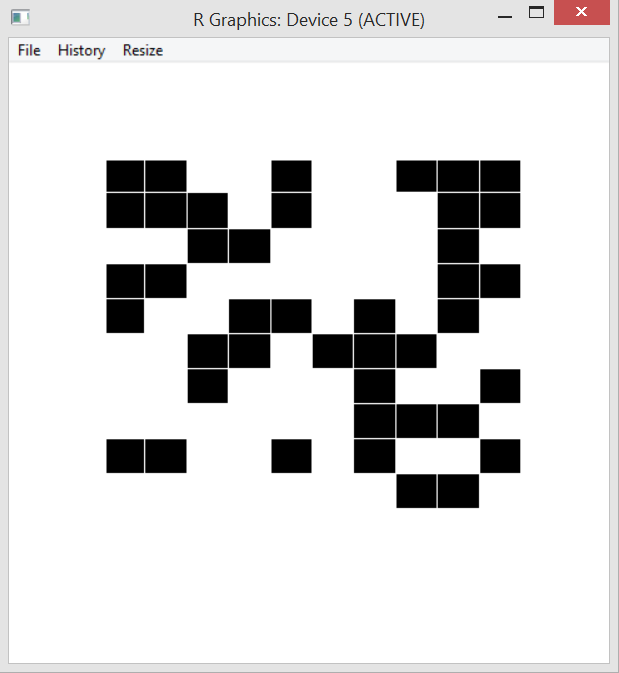
Percolation is meant to model physical or social systems where some type of blockage occurs. The algorithm taught in the class is to begin with full blockage and to randomly unblock one element until there is a path from one side of the system to another. The simplest method of doing this is to imagine a blocked grid. The initial blocked system is shown below.

percolation start

My algorithm removes one blockage per half second and this is modeled by turning the black box white. A totally percolated system is shown below. Notice there is now a path through the blockage – by starting at the bottom, following the open (white) squares up and to the left and then diagonally up and to the right.

percolation end

At the moment percolation is completed a message is printed to the console.

percolation output

The code to initialize the board and percolated system and to run the clearing algorithm is shown below.

####################################################################
# James McCammon
# 21 Feb 2015
# Percolation Algorithm Functions Version 1
####################################################################
# Load libraries
library(shape)
source("perc_functions.R")
 
# Define variables
nrows = 10
ncols = 10
nsites = nrows*ncols
closedSites = 1:nsites
numneighbors = 4
display = NULL
#display = matrix(data=0, nrow=nrows, ncol=ncols)
VTN = nsites + 1
VBN = nsites + 2
 
# Initailize board
board = initBoard()
initDisplay()
initVTN()
initVBN()
 
# Run main
main()

Created by Pretty R at inside-R.org

Most of the work is done in the set of functions below. This can definitely be improved, for example by incorporating an arbitrary list of neighbors into each site object rather than assuming the system is a square grid and determining neighbors by looking in the four quadrants around each site. I could also think harder about memory usage. Right now I just threw everything into the global environment and didn’t think too hard about memory usage or efficiency. Using the tracemem() function from the pryr shows there are a few times the board object is copied. I’ll probably play around with things and continue to improve them.

####################################################################
# James McCammon
# 21 Feb 2015
# Percolation Algorithm Main Version 1
####################################################################
# Define main function
main = function() {
  sleeptime = 0.5
 
  while(!connected(VTN, VBN)) {
    randSite = getRandSite()
    board[[randSite]]$open = TRUE
    #location = trans2display(randSite)
    #write2display(location)
    filledrectangle(mid=c(display[[randSite]]$xmid, 
                          display[[randSite]]$ymid), 
                    display[[randSite]]$wx, 
                    display[[randSite]]$wy, 
                    col='white', 
                    lwd=1, 
                    lcol='white')
 
    neighbors = getNeighbors(randSite)
 
    for(i in 1:numneighbors) {
      if(is.null(neighbors[[i]])) next
      if(!isOpen(neighbors[[i]])) next
      join(randSite, neighbors[[i]])
    } 
    Sys.sleep(sleeptime)
  }
  print("Percolation completed")
  p = 1 - (length(closedSites)/nsites)  
  return()
}
 
 
#Initalize the display
initDisplay = function() {
  display <<- as.vector(1:nsites, mode='list')
  windows(5, 5)
  plot.new()
  xmid = 0
  ymid = 1
  wx = .1
  wy = .1
  index = 1
 
  for(row in 1:nrows) {
    for(col in 1:ncols) {
      filledrectangle(mid=c(xmid, ymid), wx=wx, wy=wy, col='black', lwd=1, lcol='white')
      display[[index]] <<- list('xmid'=xmid, 'ymid'=ymid, 'wx'=wx, 'wy'=wy)
      index = index + 1
      xmid = xmid + .1
    }
    xmid = 0
    ymid = ymid - .1
  }  
}
 
 
# Gets root 
getRoot = function(node) {
  while(node != board[[node]]$root) {
    board[[node]]$root <<- board[[board[[node]]$root]]$root
    node = board[[node]]$root
  }
  return(node)
}
 
 
# Checks if two notes are connected
connected = function(node1, node2) {
  return(getRoot(node1) == getRoot(node2))
}
 
 
# Initalize board
initBoard = function() {
  board = as.vector(1:nsites, mode='list')
  board = lapply(board, function(i) list("index"=i, "size"=1, "root"=i, "open"=FALSE))
  return(board)
}
 
 
# Initalize virtural top node
initVTN = function() {
  board[[VTN]] <<- list("index"=VTN, "size"=(ncols + 1), "root"=VTN, "open"=FALSE)
  lastrow = nsites - ncols + 1
  for(i in 1:ncols)  {
    board[[i]]$root <<- board[[VTN]]$root
  }  
}
 
 
# Initalize virtual bottom node
initVBN = function() {
  board[[VBN]] <<- list("index"=VBN, "size"=(ncols + 1), "root"=VBN, "open"=FALSE)
  lastrow = nsites - ncols + 1
  for(i in lastrow:nsites) {
    board[[i]]$root <<- board[[VBN]]$root
  }  
}
 
 
# Choose random site
getRandSite = function() {
  randSite = sample(closedSites, size=1)
  closedSites <<- closedSites[-which(closedSites==randSite)]
  return(randSite)
}
 
 
# Checks if site is open
isOpen = function(site) {
  return(!(site%in%closedSites))
}
 
 
# Get neighbors on a square board
getNeighbors = function(index) {
  top = index - ncols
  if(top < 1) top = NULL
 
  bottom = index + ncols
  if(bottom > nsites) bottom = NULL
 
  left = index - 1
  if(!(left%%ncols)) left = NULL
 
  right = index + 1
  if(right%%ncols == 1) right = NULL
 
  return(list("tn"=top, "rn"=right, "bn"=bottom, "ln"=left))
}
 
 
# Join two nodes
join = function(node1, node2) {
 
  r1 = getRoot(node1)
  r2 = getRoot(node2)
  s1 = board[[r1]]$size
  s2 = board[[r2]]$size
 
  if(s1 > s2) {
    board[[r2]]$root <<- board[[r1]]$root
    board[[r1]]$size <<- s1 + s2
  }
 
  else {
    board[[r1]]$root <<- board[[r2]]$root
    board[[r2]]$size <<- s2 + s1 
  } 
}
 
 
####################################################################
# Functions for visualizing output with matrix
####################################################################
# Translate location of site to matrix
trans2display = function(index) {
  col = index%%ncols
  if(!col) col=ncols
  row = ceiling(index/nrows)
  return(list("row"=row, "col"=col))  
}
 
 
# Update the matrix display
write2display = function(transObject) {
  display[transObject$row, transObject$col] <<- 1  
}

Created by Pretty R at inside-R.org

Shiny Web App

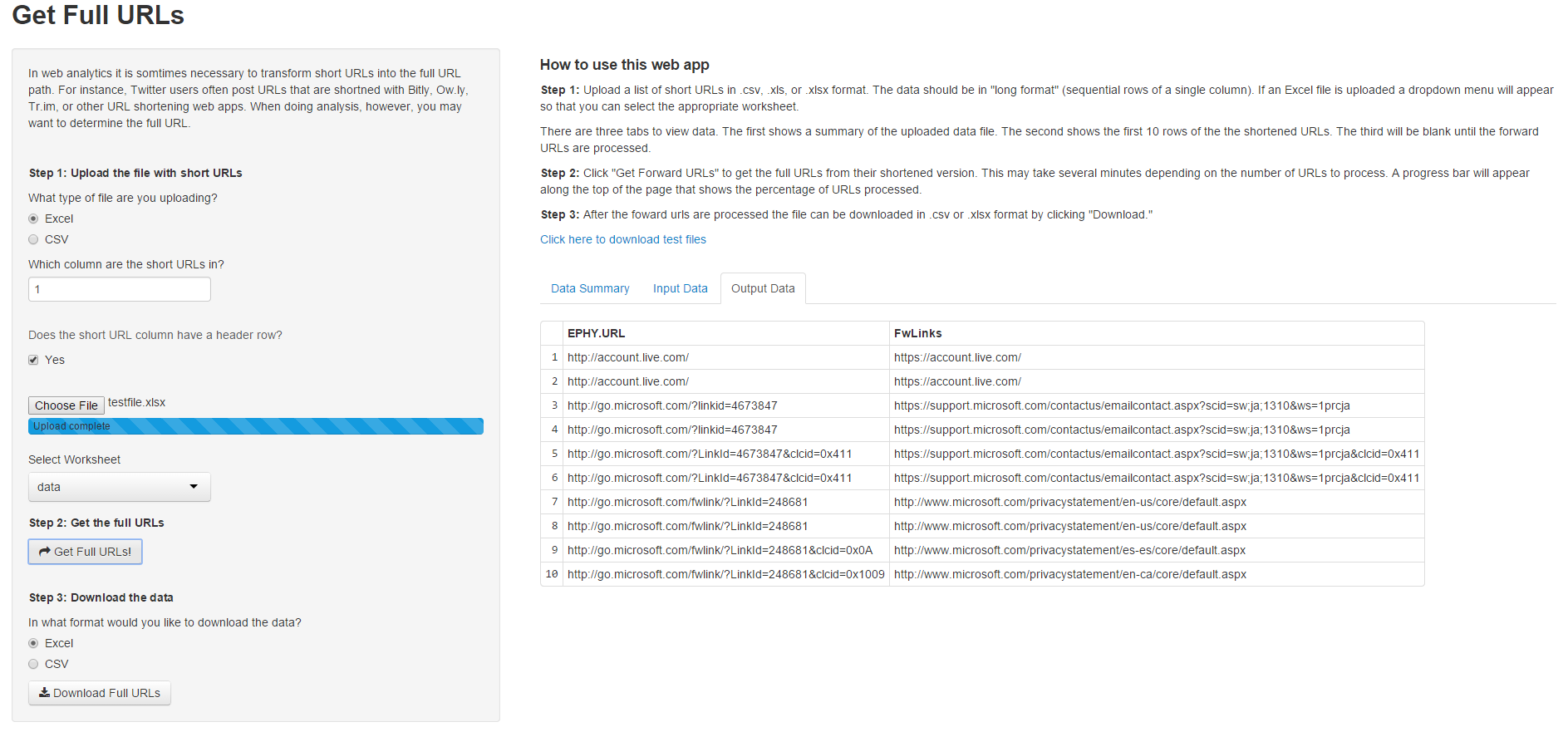
I’ve created my first Shiny web app! The web app takes in a .csv or Excel file of short URLs and returns the full URLs. This can be a necessary process in some web analysis and can take many hour to do by hand if there are thousands of links (as there often are). A screenshot of the web app is below. And you can use the web app by going here:

https://jamesmccammon.shinyapps.io/Forward_Links

Shiny App FwdLinks Screenshot

The web app allows input in .csv and Excel formats and also allows the user to export the full URLs in .csv and Excel formats. If an Excel file is used as input a drop down menu automatically appears so the user can select the appropriate worksheet. There is also a progress bar and error handling in case something goes wrong.

A Shiny web app is composed of two files: a user interface file – ui.R – and a server file – server.R. Shiny was recently updated to allow a single file to contain both functions, but I prefer keeping the files separate for clarity. There is a separate function (not shown here) I wrote in R to get the forward URLs.

ui.R is below.

require(shiny)
 
shinyUI(fluidPage(
  titlePanel("Get Full URLs"),
 
  tags$head(
    tags$style(HTML("   
      .errortext {
        font-size: 1em;
        color: red;
        padding-top: 1em;
        padding-bottom: 1em;
      }
    "))
  ),
 
  sidebarLayout(
    sidebarPanel(
      p('In web analytics it is somtimes necessary to transform short URLs into the full
        URL path. For instance, Twitter users often post URLs that are shortned with 
        Bitly, Ow.ly, Tr.im, or other URL shortening web apps. When doing analysis, however,
        you may want to determine the full URL.'), br(),
 
 
      h5('Step 1: Upload the file with short URLs'),
      radioButtons(inputId = 'inputformat',
                   label = 'What type of file are you uploading?',
                   choices = c('Excel' = 'excel', 'CSV' = 'csv')),         
      numericInput(inputId = 'datacol',
                   label = 'Which column are the short URLs in?',
                   value = 1,
                   min = 1,
                   max = 10,
                   step = 1), br(), br(),      
      helpText('Does the short URL column have a header row?'),
      checkboxInput(inputId = 'dataheader',label = 'Yes',value = TRUE), br(),
      fileInput(inputId = 'datafile', label = ''),
      uiOutput('worksheets'), 
 
      h5('Step 2: Get the full URLs'),
      actionButton(inputId = "getlinks", label = "Get Full URLs!", icon = icon("mail-forward")), br(), br(),
 
 
      h5('Step 3: Download the data'),
      radioButtons(inputId = 'outputformat',
                   label = 'In what format would you like to download the data?',
                   choices = c('Excel' = 'excel', 'CSV' = 'csv')),
      downloadButton('downloadlinks','Download Full URLs')      
      ),
 
    mainPanel(
      #textOutput('testing'),  
      h4('How to use this web app'),
        p(strong('Step 1:'), 'Upload a list of short URLs in .csv, .xls, or .xlsx format.
          The data should be in "long format" (sequential rows of a single column).
          If an Excel file is uploaded a dropdown menu will appear so that you can 
          select the appropriate worksheet.'),
        p('There are three tabs to view data. The first shows a summary of the 
          uploaded data file. The second shows the first 10 rows of the the shortened URLs. 
          The third will be blank until the forward URLs are processed.'),
        p(strong('Step 2:'), 'Click "Get Forward URLs" to get the full URLs from their shortened version. 
          This may take several minutes depending on the number of URLs to process. A progress 
          bar will appear along the top of the page that shows the percentage of URLs processed.'),
        p(strong('Step 3:'), 'After the foward urls are processed the file can be downloaded in .csv or .xlsx 
          format by clicking "Download."'),
        a('Click here to download test files', 
          href= 'https://www.dropbox.com/sh/tq2amcgfm7o99qi/AABrJVU4mNquOw-zmmRbRcaMa?dl=0',
          alt = 'Link to public Dropbox account with test files',
          target = '_blank'), br(), br(),
 
      uiOutput('errortext'),
 
      tabsetPanel(id = "datatabs",
                  tabPanel(title = "Data Summary", value = 'datasumtab', tableOutput('inputsum')),          
                  tabPanel(title = "Input Data", value = 'inputdatatab', tableOutput('inputdata')),
                  tabPanel(title = "Output Data", value = 'outputdatatab', tableOutput('outputdata'))
      )
    )  
  )
))

Created by Pretty R at inside-R.org

And here is server.R.

######################################################
# James McCammon
# 28 December 2014
# Get Full URLs function
# Version 4
######################################################
 
# Load libraries and source functions
require(shiny)
require(RCurl)
require(XML)
require(XLConnect)
source("functions.R")
 
# Define server instance
shinyServer(function(input, output, session) {
 
  # Initialize reactive values 
  values = reactiveValues()
 
  # Function to get file path of uploaded file
  filepath = reactive({
    file = input$datafile
    if(is.null(file)) return()
    return(file$datapath)
  })
 
  # If the uploaded file is Excel create a dropdown menu so the user can select the
  # worksheet with the relevant data.
  observe({
    if(is.null(input$dynamicinput)) {
      if(input$inputformat == 'excel' & !is.null(filepath())) {
        possibleerror = try(values$workbook <- loadWorkbook(filepath()), silent = TRUE)
        if(class(possibleerror) == 'try-error') { seterror('excelloaderror'); return() }
        sheetNames = getSheets(values$workbook)
        output$worksheets = renderUI({
          selectInput(inputId = "dynamicinput", 
                      label = "Select Worksheet",
                      choices = c(sheetNames,'Select' = 'select'),
                      selected = 'select')    
        })
      }
    }
  })
 
  # Create a table with summary data of the file
  output$inputsum = renderTable({
    if(is.null(input$datafile)) return()
    return(input$datafile)
  })
 
  # Create a table with the first 10 rows of the input data
  output$inputdata = renderTable({
    if(is.null(input$datafile) | is.na(input$datacol)) return()
      clearerror()
      # Load the relvant data depending on the file type. If the specified file type doesn't
      # match the loaded file throw an error.
      inputdata = switch(input$inputformat,
                   'excel' = {
                     if(is.null(input$dynamicinput)) return()
                     if(input$inputformat == 'excel' & input$dynamicinput == 'select') return()
                     tryCatch({ readWorksheet(values$workbook, sheet = input$dynamicinput, header = input$dataheader)
                     }, error = function(e) { seterror('excelreaderror'); return() })
                   },
                   'csv' = {
                     tryCatch({ read.csv(file = filepath(), header = input$dataheader, stringsAsFactors = FALSE)
                     }, error = function(e) { seterror('csvloaderror'); return() })
                   })
      # Take the data and get out the first 10 rows. If there is an error it's likely because
      # the specified worksheet or data column has no data. Tell the user this if an error occurs.
      values$inputdata = inputdata
      possibleerror = try(inputdata <- inputdata[[input$datacol]], silent = TRUE)
      if(class(possibleerror) == 'try-error') { seterror('subscripterror'); return() }
      inputdata = as.data.frame(inputdata[1:10])
      names(inputdata)[1] = "short_url_preview" 
      return(inputdata)   
  })
 
  # When the users pushes the "Get Full URLs" button get the URLs by calling the getFWLinks function
  # found in Functions.R. If there is no inpupt data let the user know they forgot to load it.
  observe({
    input$getlinks
    if(input$getlinks == 0) return()
    else {
      updateTabsetPanel(session, inputId = "datatabs", selected = "outputdatatab")
      output$outputdata = renderTable({
      possibleerror = try(values$output <- isolate(getFwLinks(as.data.frame(values$inputdata), input$datacol)), silent = TRUE)
      if(class(possibleerror) == 'try-error') { seterror('nodataerror'); return() }  
      return(as.data.frame(values$output[1:10,]))  
      })  
    }
  })
 
  # When the user selects "Download Full URLs" download them in the specified format.
  # Note the file.rename function is used to handle the temporary filepath created by Shiny.
  output$downloadlinks = downloadHandler(
    filename = function() {
      filename = switch(input$outputformat,
                        'excel' = 'Full_URLs.xlsx',
                        'csv' = 'Full_URLs.csv'
                        )
    },
    content = function(file) {
      if(input$outputformat == 'csv') {
        write.csv(values$output, 'temp.csv', row.names = FALSE)
        file.rename('temp.csv', file)    
      } 
      else {
        outputdata = loadWorkbook('temp.xlsx', create = TRUE)
        createSheet(object = outputdata, name = 'Full_URLs')
        writeWorksheet(outputdata, data = values$output, sheet = 'Full_URLs')
        saveWorkbook(outputdata, 'temp.xlsx')
        file.rename('temp.xlsx', file)    
      }
    }
  )
 
  # Create a function to ouput various error messages
  seterror = function(error) {
    errormessage = switch(error,
                    'excelloaderror' =  'Error: There was an error loading the file. 
                                         Are you sure it is an Excel file? Try changing
                                         your selection to CSV.',
                    'excelreaderror' =  'Error: The workbook loaded, but there was
                                         an error reading the specified worksheet',
                    'csvloaderror'   =  'Error: There was an error loading the file. 
                                         Are you sure it is a csv file?',
                    'fullurlserror'  =  'Error: There was a problem getting the full URLs.
                                         Are you sure you selected the correct data column?',
                    'subscripterror' =  'Error: There does not seem to be any data there.',
                    'nodataerror'    =  'Error: Did you forget to upload data?')
 
    output$errortext = renderUI({
      tags$div(class = "errortext", checked = NA, 
               tags$p(errormessage))
    })
  }
 
  # Define a function to clear error messages.
  clearerror = function() {
    output$errortext = renderUI({
      p('')
    })
  }  
})

Created by Pretty R at inside-R.org

Twitter Data!!!

I wanted to experiment with getting some Twitter data over the Thanksgiving break for one of my clients that does a fair amount of retail sales. I connected to the Twitter public stream using the “streamR” package and filtered based on around 30 hashtags. The idea was – well is, Cyber Monday is only just ending – to import the data into CartoDB. I tried this with some sample data from Twitter without worrying about filtering by hashtag and it looked great (CartoDB seems to be a pretty great tool). This “analysis” is more of what I like to call a “bonus treat” than actionable data, but why not have some fun. And who knows, maybe in analyzing the data some interesting trends will pop out. The final batch of data is just finishing up (I collected 8 .json files to make sure the file sizes were manageable since this is an experiment).

I wrote a quick little function that reads all of the .json files end, parses them, and does an initial reduction of the main columns I’m interested in (the original .json object creates an R dataframe with 43 columns). For this function I played around with the “foreach” package, which i really like and also allows you to run functions using multiple processors. The documentation says it may not work correctly for connections – and opening a file is a connection – but I used R to time the two methods – one with a single processor and one using two processors – and the loading function was about 30% faster using two.

source(file = "TwitterAnalysisFunctions.R")
 
cl = makeCluster(2)
registerDoParallel(cl)
fileList = list.files(getwd())
TwitterFiles = grep(pattern = ".json", x = fileList)
TweetDF = foreach(file=1:length(TwitterFiles), .combine = rbind, .packages = 'streamR') %dopar% { 
                      loadTweets(parseTweets(fileList[TwitterFiles[file]],verbose = FALSE)) 
}
stopCluster(cl)

Created by Pretty R at inside-R.org

Here are the helper functions I wrote to perform various common tasks. I used the “dplyr” package as much as possible because of its speed and adeptness and handling large dataframes.

#################################################################################################
# A function to load Tweets
#################################################################################################
loadTweets = function(df) {
  require(dplyr)
  Tweets = 
    df %>% 
    # Select needed columns
    select(Tweet = text,
           Retweets = retweet_count,
           Time = created_at,
           Language = lang,
           Location = location,
           Time.Zone = time_zone,
           Lat = lat,
           Long = lon) %>%
    mutate(Implied.Location = ifelse(!is.na(Lat), "Lat/Long Available", Location)) 
  return(Tweets)
}
 
 
#################################################################################################
# A function to remove spurious characters from a string
#################################################################################################
cleanText = function(df, colName) {  
  # Create list of strings
  stringsList = strsplit(as.vector(df[[colName]], mode = "character"), split = " ")
  # Clean every entry
  cleanTextList = sapply(stringsList, FUN = function(text) {
    nonLatinStrings = grep("s2Rz", iconv(x = text, from = "latin1", to = "ASCII", sub = "s2Rz"))
    if(length(nonLatinStrings) > 0) strings2keep = text[-nonLatinStrings]
    else strings2keep = text
    cleanText = paste(strings2keep, collapse = " ")
    return(cleanText)
  })
  df[[colName]] = cleanTextList
  return(df)
}
 
 
#################################################################################################
# A function to extract Lat/Longs
#################################################################################################
extractLatLong = function(df, searchCol, latCol, longCol) {
  require(stringr)
  latlongFinder = "(\\-?[0-9]{1,3}(\\.[0-9]+)?),\\s*(\\-?[0-9]{1,3}(\\.[0-9]+)?)"
  latlongs = strsplit(x = str_extract(df[[searchCol]], pattern = latlongFinder), split = ",")
  rowIndex = which(!is.na(latlongs))
  df[rowIndex , latCol] = unlist(latlongs[rowIndex])[seq(from = 1, to = length(unlist(latlongs[rowIndex])), by = 2)]
  df[rowIndex , longCol] = unlist(latlongs[rowIndex])[seq(from = 2, to = length(unlist(latlongs[rowIndex])), by = 2)]
  df[rowIndex, searchCol] = "Lat/Long Available"
  return(df)
}
 
#################################################################################################
# A function to prepare Implied.Location for geocoding
#################################################################################################
prepareLocForGeoCodeing = function(df) {
  excludePattern = paste0("\\.com|\\.net|\\.org|planet|world|xbox|earth|my |world|home|sofa|couch|",
                          "globe|global|here|facebook|internet|!|/|Lat/Long Available")
  cleanLocations = df %>%
    select(Implied.Location) %>% 
    filter(!grepl(x = df[["Implied.Location"]], pattern = excludePattern, ignore.case = TRUE)) %>%
    do(cleanText(.,"Implied.Location")) %>%
    distinct()
  return(cleanLocations)
}
 
#################################################################################################
# A function to remove blank entries
#################################################################################################
filterBlanks = function(df, colName) {
  require(dplyr)
  return(filter(df, df[[colName]] != ""))
}
 
#################################################################################################
# A function to get unique Tweets dataframe
#################################################################################################
getUniqueTweetsDF = function(df, colName) {
  require(dplyr)
  df[[colName]] = gsub(pattern = "RT ", replacement = "", x = df[[colName]])
  Tweets = df %>% 
    filter(Language == "en") %>%
    distinct(.) 
  return(Tweets)
}
 
#################################################################################################
# A function to get unique Tweets vector
#################################################################################################
getUniqueTweetsVector = function(df, colName) {
  return(getUniqueTweetsDF[[colName]])
}
 
#################################################################################################
# A function to get unique entries and return a dataframe
#################################################################################################
getUniqueEntriesDF = function(df, colName) {
  require(dplyr)
  return(distinct(df, df[[colName]]))
}
 
#################################################################################################
# A function to get unique entries and return a vector
#################################################################################################
getUniqueEntriesVector = function(df, colName) {
  require(dplyr)
  return(distinct(df, df[[colName]])[colName])
}
 
 
#################################################################################################
# A function to search for Tweets containing certain words
#################################################################################################
searchForTweets = function(df, colName, wordList) {
  require(dplyr)
  wordList = paste(as.vector(wordList, mode = "character"), collapse = "|")
  df = getUniqueTweets(df, colName)
  return(filter(.data = df, grepl(x = df[[colName]], pattern = wordList)))
}
 
#################################################################################################
# A function to make a word cloud
#################################################################################################
makeWordCloud = function(df, colName) {
  require(tm)
  require(wordcloud)
 
  # Clean data using the tm package and custom getUniqueTweets
  textCorpus = Corpus(VectorSource(getUniqueTweetsVector(df, colName)))
  textCorpus <- tm_map(textCorpus, content_transformer(tolower))
  textCorpus <- tm_map(textCorpus, removePunctuation)
  textCorpus <- tm_map(textCorpus, function(x) removeWords(x,stopwords("english")))
 
  # Make word cloud
  wordcloud(textCorpus, min.freq = 10, max.words = 300, random.order = FALSE, colors = brewer.pal(8,"Dark2"))
}

Created by Pretty R at inside-R.org

R Functions to Download and Load Data

I’ve been writing a lot of R code recently and since I’m always downloading and loading files I decided to write a couple of helper functions. The first function “getData” can download and unzip (if necessary) files from the internet making minor adjustments in the connection to account for differences in operating system. Certainly not as robust as the “Downloader” package, but useful for most simple operations.

The next function “loadData” can automatically load a set of files and automatically assigns a name in R which is the same as the file name. I added a simple progress bar to this function since it can sometimes take a while to load several large files. You can see how to use the two functions here:

# Specify directories and file names
fileURL = 'A file URL'
fileName = 'AZippedFile.zip'
subDir = 'aSubDirectory'
# Download data and put in directory using custom function
getData(fileURL, fileName, subDir, compressed = TRUE)
 
# Load required files into R 
# Get file names
fileNames = list.files(subDir, full.names = TRUE, recursive = TRUE)
# Specify required files
requiredFiles = c("file1.txt", "file2.txt", "file3.txt")
# Get required files from the list of files using custom function
loadData(fileNames, requiredFiles, envir = .GlobalEnv)

Created by Pretty R at inside-R.org

Here are the two custom functions:

# Get data function
getData = function(fileURL, fileName, mainDir = getwd(), subDir = ".", compressed = FALSE, OS = "Unspecified") {
  # If the data doesn't exist download it and setup a folder to store it
  if (!file.exists(file.path(mainDir, subDir, fileName))) {
    print("Downloading data and creating file directory...")
    method = switch(tolower(OS),
                    "windows" = "internal",
                    "mac" = "curl",
                    "lynx" = "wget",
                    "auto")
    dir.create(file.path(mainDir, subDir), showWarnings = FALSE)
    filePath = file.path(mainDir, subDir, fileName)
    download.file(fileURL, destfile = filePath, method)
    if (compressed) unzip(filePath, exdir = subDir)
  }
  else {
    print("Files already download. Ready to read into R memory.")
  }
}
 
# Load data function
loadData = function(fileNames, requiredFiles, envir = environment()) {
  numFiles = length(requiredFiles)
  pb = txtProgressBar(min = 0, max = numFiles, style = 3)
  # Load each file into R
  print("Loading files into memory. Please wait.")
  for (file in 1:numFiles) {
    elem = requiredFiles[file]
    filePath = paste0("/",elem)
    R_Object = gsub(".txt", "", elem)
    assign(R_Object, read.table(fileNames[grep(filePath, fileNames)], header=FALSE), envir)
    setTxtProgressBar(pb, file)
  }
  close(pb)
  print("Files loaded.")
}

Created by Pretty R at inside-R.org

Splines!

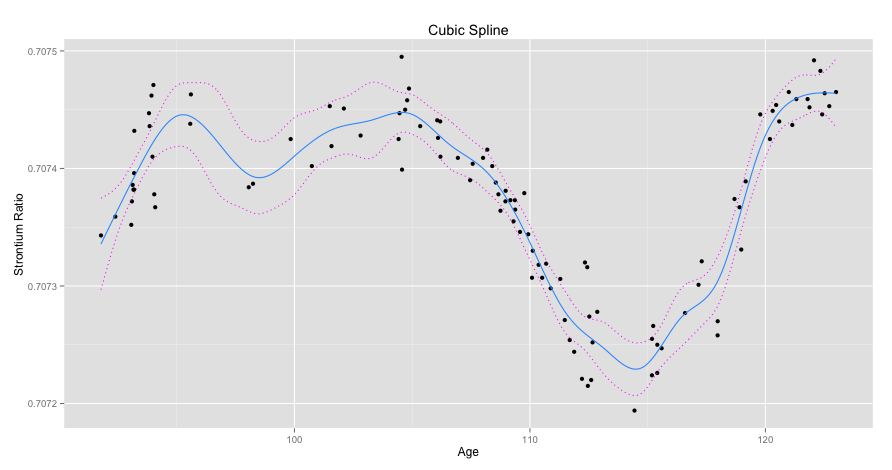
Splines are a popular way to fit data that allow for a good fit when the data has some sort of global curvature (see the graph below for an example). A cubic spline is a popular example. It allows for a cubic polynomial to be fit within some neighborhood between so-called “knots.” So for the graph below you might have a knot at age 0 and another knot at age 50, yet another knot at age 100, and so on. Within each segment of the data defined by these knots you fit a cubic polynomial. You then require that at the knot locations where the different polynomials meet they must join together in a smooth way (this is done by enforcing the first and second derivatives be equal at the knot).

Below a spline with 20 evenly spaced knot locations is shown for some dummy data. I’ve also graphed a 95% confidence interval of the spline predictions in dotted red.

cubic spline

Here’s the code I used to produce it.

# Load libraries
library(reshape)
library(mgcv)
library(ggplot2)
library(data.table)
 
# Load data
setwd("Masked")
data <- read.csv(file = "Masked", header = TRUE)
attach(data)
 
# Create 20 evenly spaced knots
splitDistance <- (max(age) - min(age))/19
knots <- seq(min(age), max(age), by = splitDistance)
 
# Fit a penalized cubic regression spline with 20 evenly spaced 
# knots using cross validation
model <- gam(strontium.ratio ~ s(age, k=20, fx=F, bs="cr", m=2), 
data=data, family=gaussian, sp = .45, knots = list(age = knots))
# Predict points to plot data 
plotPoints <- seq(min(age), max(age), by = .05)
yHat <- predict.gam(model, list(age = plotPoints), se.fit = TRUE)
 
# Create 95% confidence interval
upper95 <- yHat[[1]] + 1.96*yHat[[2]]
lower95 <- yHat[[1]] - 1.96*yHat[[2]]
 
# Prepare data for plotting
spline <- as.data.frame(cbind(plotPoints,yHat[[1]]))
setnames(spline,"V2","value")
CI <- as.data.frame(cbind(plotPoints,upper95,lower95))
CI <- melt(CI, id = "plotPoints", 
variable_name = "Confidence.Interval")
 
# Plot data
ggplot() +
geom_point(data = data, aes(x = age, y = strontium.ratio)) +
geom_line(data=spline, aes(x = plotPoints, y = value), 
colour = '#3399ff') +
geom_line(data=CI, aes(x = plotPoints, y = value, 
group = Confidence.Interval),linetype="dotted",colour = '#ff00ff') +
ggtitle("Cubic Spline") + 
xlab("Age") + 
ylab("Strontium Ratio")

Created by Pretty R at inside-R.org

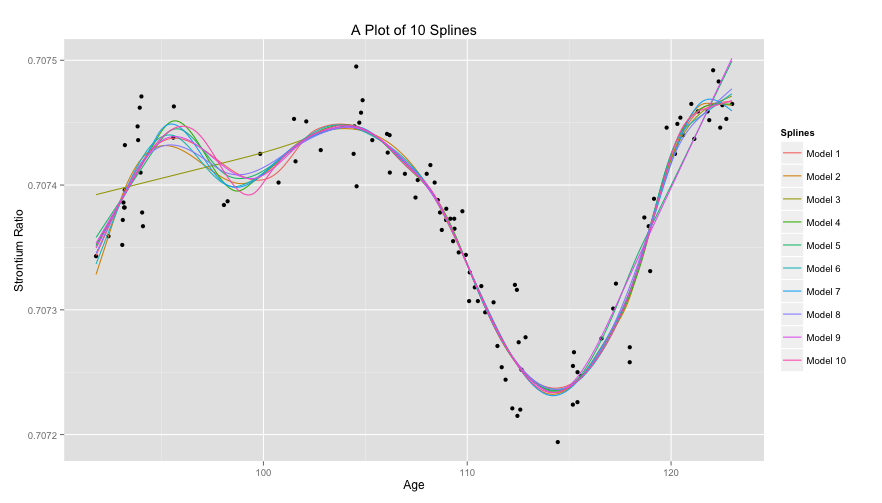
To show the effect of knot placement we can generate 20 random knot locations for multiple models and compare them. Since these are so-called natural splines linearity is enforced after the last knot. Here, Model 3 had it’s first knot generated quite far on the righthand side of the Age axis and so it’s linear to the left of that point.

10 Splines

Again, here’s the code.

# Create 10 models with random knot placement
set.seed(35)
models <- as.data.frame(lapply(1:10,
                        FUN = function(i) {
                        knots <- sort(runif(20, min(age), 
                        max(age)))
                        model <- gam(strontium.ratio ~ 
                        s(age, k=20, fx=F, bs="cr", m=2), 
                        data=data, family=gaussian, 
                        method="GCV.Cp", 
                        knots = list(age = knots))
                        return(predict(model,
                        list(age = plotPoints)))
                        }))
 
colnames(models) <- lapply(1:10,
                    FUN = function(i) {
                    return(paste("Model",i))
                    })
 
# Plot splines
models <- cbind(plotPoints, models)
models <- melt(models, id = "plotPoints", variable_name = "Splines")
 
ggplot() +
geom_point(data = data, aes(x = age, y = strontium.ratio)) +
geom_line(data = models, aes(x = plotPoints, y = value, 
group = Splines, colour = Splines)) +
ggtitle("A Plot of 10 Splines") + 
xlab("Age") + 
ylab("Strontium Ratio")

Created by Pretty R at inside-R.org

Lasso and Ridge Regression in R

Lasso and ridge regression are two alternatives – or should I say complements – to ordinary least squares (OLS). They both start with the standard OLS form and add a penalty for model complexity. The only difference between the two methods is the form of the penality term. Ridge regression uses the \mathbf{\mathit{l}_{2}}-norm while lasso regression uses the \mathbf{\mathit{l}_{1}}-norm. Specifically the forms are shown below.

Ridge Regression: \mathbf{\hat{\beta}^{ridge} = \displaystyle arg\min_{\beta}\sum^{n}_{i=1}(y_i-(\beta_0 + \beta^Tx_i))^2 + \lambda\|\beta\|_{2}^{2}}

Lasso Regression: \mathbf{\hat{\beta}^{lasso} = \displaystyle arg\min_{\beta}\sum^{n}_{i=1}(y_i-(\beta_0 + \beta^Tx_i))^2 + \lambda\|\beta\|_{1}}

Ridge regression has a closed form solution that is quite similar to that of OLS: \mathbf{\hat{\beta}^{ridge} = (X^TX + \lambda I)^{-1}X^Ty} The only difference is the \mathbf{\lambda I} term. I read (or heard) somewhere that ridge regression was originally designed to deal with invertability issues in OLS. By adding the small \mathbf{\lambda I} term we get the inner product to move away from possible singular matrices.

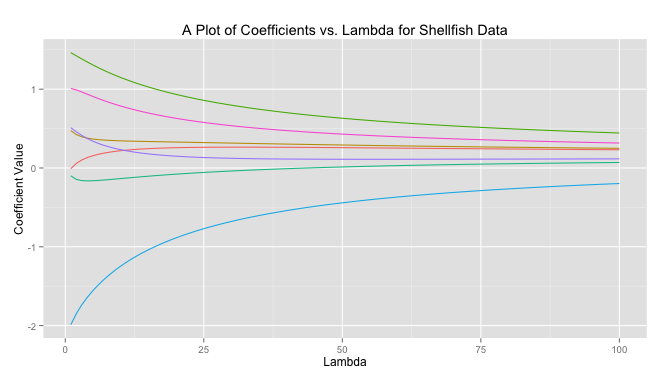
In ridge regreession when \mathbf{\lambda} is close to zero the ridge solution approachese the least squares solution. As \mathbf{\lambda} increases the solutions are forced toward zero. You can see this behavior graphed below for a sample dataset.

CoefvLambda

The code to produce this graph is quite simple.

# Load libraries
library(MASS)
library(reshape)
library(psych)
library(ggplot2)
 
# Get data
data read.csv(file = "Masked")
# Prepare data
X data[,-10]
X scale(X, center = TRUE, scale = TRUE)
response data[,10]
response scale(reponse, center = TRUE, scale = FALSE)
 
# Get ridge solution for every lambda
betas matrix(rep(NA), nrow = 7, ncol = 100)
rownames(betas) colnames(X)
lambda 1:100
betas lapply(1:length(lambda),
               FUN = function(i) {  
               return(solve(t(X)%*%X + diag(x = lambda[i], 
               ncol(X)) )%*%t(X)%*%response)  
               })
 
# Prepare data for plot
betas data.frame(t(betas))
betas cbind(lambda, betas)
betas (betas, id = "lambda", variable_name = "coviariate")
 
# Plot
ggplot(betas, aes(lambda, value)) + 
geom_line(aes(colour = coviariate)) + 
ggtitle("A Plot of Coefficients vs. Lambda for Shellfish Data") + 
xlab("Lambda") + 
ylab("Coefficient Value") + 
theme(legend.position = "none")

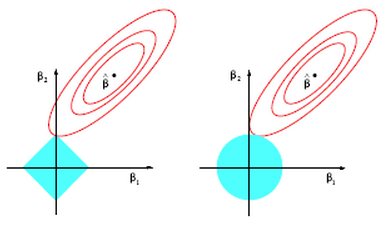
Lasso on the other hand does not have a closed form solution so numerical techniques are required. The benefit of lasso, however, is that coefficients are driven to exactly zero. In this way lasso acts as a sort of model selection process. The reason ridge regression solutions do not hit exactly zero, but lasso solutions do is because of the differing nature of the geometry of the \mathbf{\mathit{l}_{1}}-norm and \mathbf{\mathit{l}_{2}}-norm. In two dimensions the difference can be viewed in the picture below. Lasso regression constraints make a diamond aligned with the \mathbf{\beta_{2}} axis (in this case). The contours inscribed by the solutions (the red circles) can easily intersect the diamond at it’s tip and force \mathbf{\beta_{1}} to zero. This is much more unlikely in the case on the right for ridge regression where the \mathbf{\mathit{l}_{2}}-norm constraint inscribes a circle (in fact there is zero probability that \mathbf{\beta_{1}} will be exactly zero).

Screen Shot 2014-04-19 at 11.19.00 PM

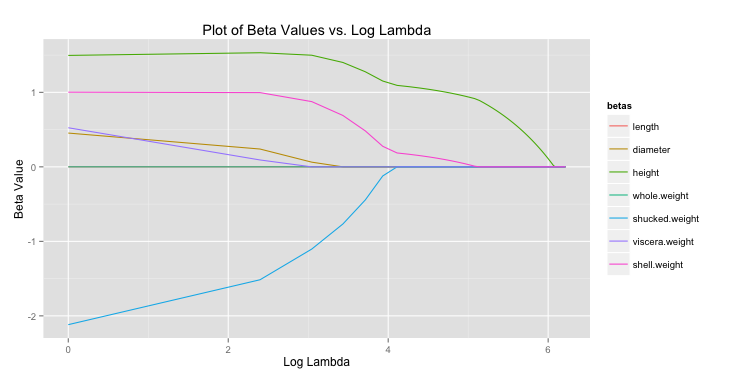
For lasso regression, then, solutions end up looking like the graph below. As \mathbf{\lambda} increases each coefficient is eventually driven to zero.

betavloglambda

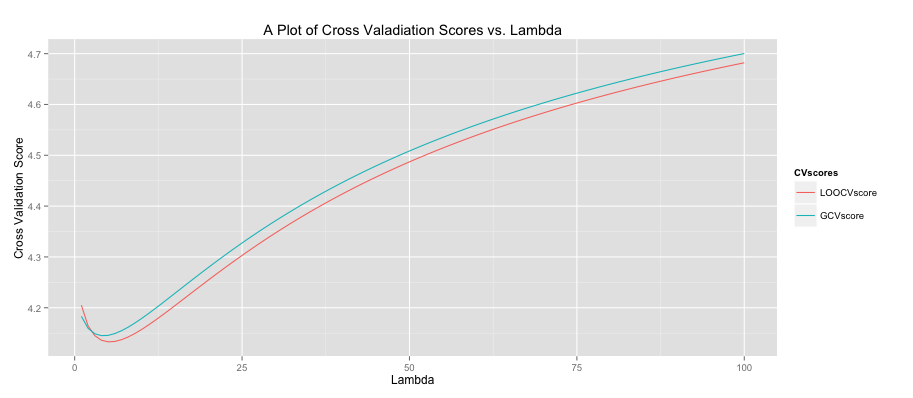
All of this begs the question, “what lambda values is ideal?” To determine this cross validation (CV) is often used. For each \mathbf{\lambda} it is possible to use CV to obtain a good estimate of the model error. You then repeat this process for all \mathbf{\lambda} within some range. The plot ends up looking like the graph below where the green line is the result of a general cross validation process and the red line uses leave-one-out cross validation. It’s interesting to note that while CV sounds like an iterative process (and in concept it is) there are fairly simple closed-form solutions for computing the CV error. I was very surprised when I first learned that! You can see below that our model should set lambda to around 4 or 5 to minimize the error (the precise value can be found by examining stored output).

CV Scores

The code to produce this graph is shown below.

# Get data
data read.csv(file = "Masked")
# Prepare data
X data[,-10]
X scale(X, center = TRUE, scale = TRUE)
response data[,10]
response scale(response, center = TRUE, scale = FALSE)
 
lambdaSeq 1:100
LOOCVscore rep(0, length(lambdaSeq))
GCVscore rep(0, length(lambdaSeq))
 
# Get leave-one-out CV score
LOOCVscore lapply(lambdaSeq,
                     FUN = function(i) {
                     lambda [i]
                     hat = X %*% (solve(t(X) %*% X + 
                     lambda*diag(ncol(X))) %*% t(X))
                     prediction = hat %*% response
                     Lii = diag(hat)
                     return(mean(((response - prediction)/
                     (1 - Lii))^2)) 
                     })
 
# Get GCV score
GCVscore lapply(lambdaSeq,
                   FUN = function(i) {
                   lambda [i]
                   hat = X %*% (solve(t(X) %*% X + 
                   lambda*diag(ncol(X))) %*% t(X))
                   prediction = hat %*% response
                   Lii = tr(hat)/nrow(X)
                   return(mean(((response - prediction)/
                   (1 - Lii))^2)) 
                   })
 
CV as.data.frame(cbind(lambdaSeq, LOOCVscore, GCVscore))
CV (CV, id = "lambdaSeq", variable_name = "CVscores")
ggplot(CV, aes(lambdaSeq, value)) + 
geom_line(aes(colour = CVscores)) +
ggtitle("A Plot of Cross Valadiation Scores vs. Lambda") + 
xlab("Lambda") + 
ylab("Cross Validation Score")

Created by Pretty R at inside-R.org

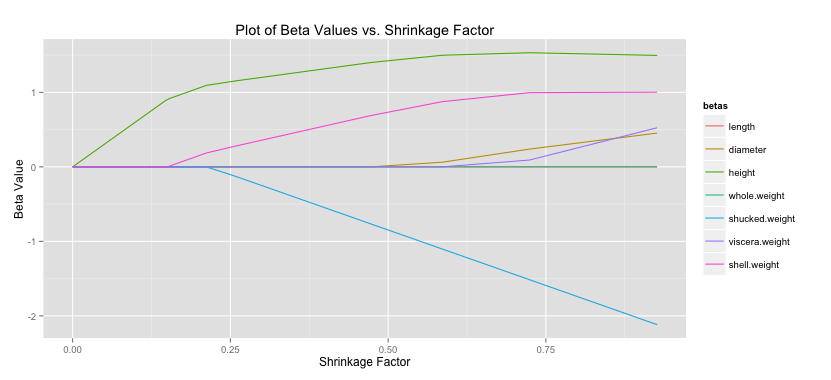
Another common statistic often presented when doing lasso regression is the shrinkage factor, which is just the ratio of the sum of the absolute value of the coefficients for the lasso solution divided by that same measure for the OLS solution. Remember small \mathbf{\lambda} forces the lasso toward the OLS solution, which implies a shrinkage factor near one should also correspond with the lasso having a solution close to OLS. You can see that patten holds below. (Code to produce this graph is shown below).

Lassobetas shrinkage

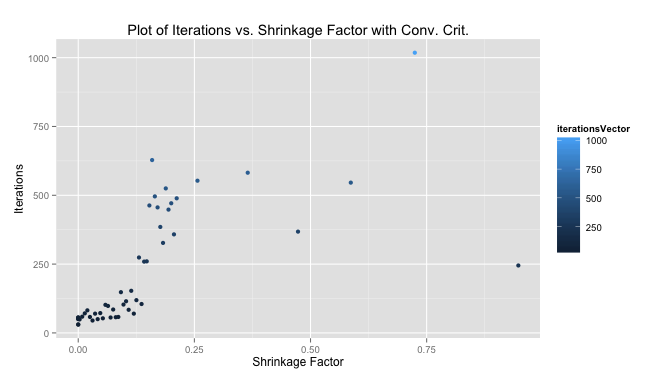
As I mentioned there is no closed-form solution that can determine the coefficients in the case of lasso regression. There are a number of methods to search through and find these betas, however. Luckily, minimizing the lasso solution results in a convex optimization problem so given enough iterations we can converge very close to the global solution. The method presented below is my implementation of the shooting algorithm. The shooting algorithm is stochastic: it picks a random beta, removes it from the model, calculates the effect of this deletion, and assigns the left out beta a value proportional to this effect, which is based on a formula I won’t present here. We were meant to determine our own criteria for stopping the loop (you could theoretically repeat this process forever). I choose a method that makes sure all betas have been updated and then calculates the MSE of the current model. If it’s within some tolerance – playing around the number suggested .001 was pretty good – the loop stops and we move on to the next lambda value. Otherwise we must continue iterating until all betas have been updated once more and the tolerance check repeats.

We were told to plot our iterations as a function of the shrinkage factor. The performance using my convergence criteria was much better than with the 1,000 iterations we were told to start with as a test case. The median number of iterations for my solution to converge quite close to the 1,000-iteration method was 103, meaning my algorithm improved performance by 10 times (at least measured by iterations).

iterationsvsConv

# Read in data
data read.csv(file = "Masked")
 
# Perpare data
X as.matrix(data[,-10])
X scale(X, center = TRUE, scale = TRUE)
response data[,10]
response scale(response, center = TRUE, scale = FALSE)
 
# Initialize variables
set.seed(35)
lambdaSeq seq(from = 1, to = 501, by = 10)
betaVectorConv matrix(NA, ncol = 7, nrow = length(lambdaSeq))
iterationsVector rep(NA, length(lambdaSeq))
aj 2*colSums(X^2)[1]
 
# Get lasso solution using shooting algorithm for each lambda
for(i in 1:length(lambdaSeq)) {
lambda [i]
betas solve(t(X) %*% X) %*% t(X) %*% response
betaUpdate rep(NA,7)
exit = FALSE
iterations  0
MSECurrent 0
MSEPast 0
 
  while(exit == FALSE) {
    j sample(1:7,1)
    betaUpdate[j] 1 
    iterations 1 
    xMinJ [,-j]
    betaMinJ [-j]
    xj [,j]
    cj 2*(t(xj) %*% (response - xMinJ %*% betaMinJ))
 
    if(cj < -lambda)      { betas[j] (cj + lambda)/aj } 
    else if(cj > lambda)  { betas[j] (cj - lambda)/aj } 
    else                  { betas[j] 0               }
 
    if(sum(is.na(betaUpdate)) == 0) {
    yHat sum((response - yHat)^2)
      if(abs(MSECurrent - MSEPast) < .001) {
      iterationsVector[i] TRUE
      }
      MSEPast rep(NA,7)
    }   
  }
  betaVectorConv[i,] }
 
#Calculate shrinkage
colnames(betaVector) colnames(X)
betaLS solve(t(X) %*% X) %*% t(X) %*% response
betaLS sum(abs(betaLS))
betaLasso abs(betaVectorConv)
betaLasso apply(betaLasso,1,sum)
betaShrink # Prepare shrinkage data for plot
betaShrinkPlot as.data.frame(cbind(betaShrink,betaVector))
betaShrinkPlot (betaShrinkPlot, id ="betaShrink",
variable_name = "betas")
 
# Plot shrinkage
ggplot(betaShrinkPlot, aes(betaShrink, value)) + 
geom_line(aes(colour = betas)) +
ggtitle("Plot of Beta Values vs. Shrinkage Factor with Conv. Crit.") + 
xlab("Shrinkage Factor") + 
ylab("Beta Value")
 
# Prepare and plot iterations
betaIterPlot as.data.frame(cbind(betaShrink, iterationsVector))
ggplot(betaIterPlot, aes(betaShrink, iterationsVector)) + 
geom_point(aes(colour = iterationsVector)) +
ggtitle("Plot of Iterations vs. Shrinkage Factor with Conv. Crit.") + 
xlab("Shrinkage Factor") + 
ylab("Iterations")

Created by Pretty R at inside-R.org

Markov Chain Monte Carlo Model Composition

One important element of prediction and classification using regression methods is model selection. A first principle of most models is parsimony, we want to add as few predictors (explanatory variables) as is necessary to do the best we can at predicting our feature set (outcome). Often not every predictor is necessary so there is some combination that produces a balance between parsimony and accuracy.

There are simple tests to help find a model with this balance.  One such test is the Akaike Information Criterion (AIC) named after the Japanese statistician Hirotugu Akaike (who was quite avuncular if his Wikipedia profile picture is any indication of his temperament). In math speak, the AIC maximizes the likelihood function by using convex optimization and has an added penalty as more predictors are added to the model.

There are simple ways to select a model. One easy way is to try every possible combination of predictors and see which one has the best AIC. At some point adding additional predictors will fail to produce much improvement in predicting the feature set and we know we can stop. This is pretty easy if you have five or ten predictor, but the number of models to test grows exponentially.

For example, a recent dataset we were given for homework in a graduate statistics course I’m taking, included 60 predictors. Each predictor can be either added to the model or left out resulting in \mathbf{2^{60}} (\mathbf{10^{18}}) possible models (including the null model with only the intercept). To give a sense of how large that is, it’s beginning to approach the number of starts in the observable universe (\mathbf{10^{24}}). Even modern computers would take too long to test every possible model.

And some models have even more variables. Many more. High-dimensional models with thousands of predictors are not uncommon. One popular example in machine learning uses MRI images where each pixel (called a voxel in this setting because it represents a 3-D slice of the brain) represents a predictor. Here there are 20,000 possible predictors: each voxel of the image can be in or out of the model, representing weather that part of the brain is important in predicting some neurologic outcome. (In practice particular – as common sense would imply – there is some dependency in choosing voxels, which makes the task slightly different).

One alternative to testing every possible combination of predictors is using a Markov Chain Monte Carlo Model Composition(MC3). It’s just a fancy way of saying that we choose a model at random and then move randomly (but intelligently) toward models that have a better AIC score.

We were asked to implement such an algorithm recently for my class. It was a pretty fun project that took some creative thinking to make efficient. The MC3 algorithm is pretty simple. We pick a random model with a random number of predictors. Then we look at all of the valid models that leave one of these predictors out as well as the valid models that add one predictor. This is called the “neighborhood” of the model. We choose one of these new models in the neighborhood at random and compute a modified version of the AIC. If it’s better than our current model’s AIC we move to that model and repeat the process. Otherwise we randomly select another candidate model, compute it’s AIC, compare scores to the current model and repeat until we move to a new model.

We were given several starter functions by our professor. All three are pretty trivial to implement oneself aside from isValidLogisticRCDD(), which implements a model validity test from a statistics paper using deep theoretical concepts far beyond mathematical knowledge.

My results are shown below. We were meant to run the algorithm for 10 instances of 25 iterations each. I store all of the relevant information in a list so when the algorithm is done running I get a nice little output. I just realize the “Iteration [number]” at the top of each column should really say “Instance”. Oops!! Just went back and fixed that in my code.

Screen Shot 2014-04-18 at 7.22.21 PM

The R code is shown below. It looks a little funky because we are transitioning to writing in C and our professor wants us to start getting into the C mindset. I’m also trying to write more loops using the apply() function instead of the traditional for loop. There are all kinds of debates online about under what cases apply() is faster than a for loop and if it’s even true in general anymore. At any rate it’s good to familiarize myself with different techniques and look at problems in different ways. I wrote several helper functions to find a models neighborhood and test the valid members in it. The MC3 function appears near the bottom along with a main() function.

#######################################################
# James McCammon 
# Description:
# MC3 uses several custom helper functions to determine
# the best AIC of a model using a markov chain process.
#######################################################
 
 
#######################################################
# Given Functions
#######################################################
getLogisticAIC <- function(response,explanatory,data)
isValidLogistic <- function(response,explanatory,data)
isValidLogisticRCDD <- function(response,explanatory,data)


##########################################################
# Custom Functions
##########################################################
 
############### checkModelValidity Function ###############
# Checks if a particular model is valid by first doing
# preliminary empirical test and then moving on to a more
# robust theoretical test
checkModelValidity <- function(response,explanatory,data) {
  prelimCheck <- isValidLogistic(response,explanatory,data)
  if(!prelimCheck) { return(FALSE) }
  robustCheck <- isValidLogisticRCDD(response,explanatory,data)
  if(!robustCheck) { return(FALSE) }
  return(TRUE) 
}
 
############### findNeighboursBelow Function ###############
# Given an arbitrary vector this function finds the set of
# all vectors generated by leaving one element out.
findNeighboursBelow  <- function(elements) {
  if(is.null(elements)) { return(NULL) }
  length = length(elements);
  neighbours = vector("list",length);
  neighbours = lapply(1:length,
                      FUN = function(i) {
                      return(elements[-i])
                      })
  return(neighbours);
}
 
############### findNeighboursAbove Function ###############
# Given an arbitrary vector this function finds the set of
# all vectors generated by adding an element not already in
# the set given an upper bound of possible elements to add.
findNeighboursAbove <- function(elements, last) {
  fullModel = seq(1,last);
  notInModel = setdiff(fullModel,elements);
  length = length(notInModel);
  neighbours = vector("list",length);
  neighbours = lapply(1:length,
                      FUN = function(i) {
                      return(union(elements, notInModel[i]))
                      })
  return(neighbours);
}
 
############### findValidNeighboursAbove Function ###############
# This function finds all of the valid neighbouring models produced
# by using the findNeighboursAbove function.
findValidNeighboursAbove <- function(response, explanatory, last, data) {
  neighbours = findNeighboursAbove(explanatory,last);
  length = length(neighbours);
  keep = rep(NA, length);
  keep = lapply(1:length,
                FUN = function(i) {
                return(checkModelValidity(response, 
                neighbors[[i]], data))
                })
  validNeighboursAbove = neighbours[as.logical(keep)];
  return(validNeighboursAbove);
}
 
##########################################################
# MC3 Function
##########################################################
 
MC3 <- function(response, explanatory, iterations, instances, 
lastPredictor) {
  require(rcdd);
  finalResults = NULL
 
  for(k in 1:instances) {
    # Make sure you start with a valid model
    initialModelValid = FALSE;
    while(!initialModelValid) {
      modelSize = sample(explanatory,1);
      initialModel = sample(explanatory, modelSize);
      initialModelValid = checkModelValidity(response, initialModel,      data);
    }
 
    # Get measures for initial model
    currentModel = initialModel;
    currentAIC = getLogisticAIC(response,currentModel,data);
 
    # Check to see if we should start at the null model
    nullModelAIC = getLogisticAIC(response = response, explanatory =    NULL, data = data)
    if(nullModelAIC < currentAIC) {
      currentModel = NULL;
      currentAIC = nullModelAIC;
      initialModel = NULL;
    }
 
    # Store initial AIC for later output.
    initialModel = currentModel;
    initialAIC = currentAIC;
 
    # Get valid neighbors of current model
    currValidNeighAbove = findValidNeighboursAbove(response, 
    currentModel, lastPredictor, data);
    currValidNeighBelow = findNeighboursBelow(currentModel);
    currAllNeigh = c(currValidNeighAbove, currValidNeighBelow);
    # Compute score
    currentScore = -currentAIC - log(length(currAllNeigh));
 
    # Iterate for the number of times specified.
    for(i in 1:iterations) {   
      # Compute measures for the candidate model
      candidateIndex = sample(1:length(currAllNeigh),1);
      candidateModel = currAllNeigh[[candidateIndex]];
      candValidNeighAbove = findValidNeighboursAbove(response, 
      candidateModel, lastPredictor, data);
      candValidNeighBelow = findNeighboursBelow(candidateModel);
      candAllNeigh = c(candValidNeighAbove, candValidNeighBelow);
 
      candidateAIC = getLogisticAIC(response, candidateModel, data);
      candidateScore = -candidateAIC - log(length(candAllNeigh));
 
      # If necessary move to the candidate model.
      if(candidateScore > currentScore) {
        currentModel = candidateModel;
        currAllNeigh = candAllNeigh;
        currentAIC = candidateAIC;
        currentScore = candidateScore;
      }
      # Print results as we iterate.
      print(paste('AIC on iteration', i ,'of instance', k , 'is', 
      round(currentAIC,2)));
    }
 
    # Produce outputs
    instanceResults = (list(
                       "Instance"            = k,
                       "Starting Model Size" = modelSize,
                       "Initial Model"       = sort(initialModel),
                       "Initial AIC"         = initialAIC,
                       "Final Model"         = sort(currentModel),
                       "Final AIC"           = currentAIC));
    finalResults = cbind(finalResults, instanceResults);
    colnames(finalResults)[k] = paste("Instance",k)
  }
  return(finalResults);
}
 
##########################################################
# Main Function
##########################################################
 
main <- function(data, iterations, instances) {
  response = ncol(data);
  lastPredictor = ncol(data)-1;
  explanatory = 1:lastPredictor;
  results = MC3(response, explanatory, iterations, instances, 
  lastPredictor);
  return(results);
}
 
##########################################################
# Run Main
##########################################################
setwd("~/Desktop/Classes/Stat 534/Assignment 3")
data = as.matrix(read.table(file = "534binarydata.txt", header = 
FALSE));
main(data, iterations = 25, instances = 10);

Created by Pretty R at inside-R.org
We were meant to run 10 instances of the algorithm for 25 iterations each. My best run was instance 8. I print out the AIC at every iteration to help keep track of things and give me that nice reassurance that R isn’t exploding at the sight of my code, which is always a fear when nothing is output for more than 5 minutes.

[1] "AIC on iteration 1 of instance 8 is 123.21"
[1] "AIC on iteration 2 of instance 8 is 104.17"
[1] "AIC on iteration 3 of instance 8 is 104.17"
[1] "AIC on iteration 4 of instance 8 is 97.31"
[1] "AIC on iteration 5 of instance 8 is 88.52"
[1] "AIC on iteration 6 of instance 8 is 88.25"
[1] "AIC on iteration 7 of instance 8 is 88.25"
[1] "AIC on iteration 8 of instance 8 is 86.64"
[1] "AIC on iteration 9 of instance 8 is 86.64"
[1] "AIC on iteration 10 of instance 8 is 83.67"
[1] "AIC on iteration 11 of instance 8 is 83.67"
[1] "AIC on iteration 12 of instance 8 is 83.67"
[1] "AIC on iteration 13 of instance 8 is 81.77"
[1] "AIC on iteration 14 of instance 8 is 81.77"
[1] "AIC on iteration 15 of instance 8 is 56.96"
[1] "AIC on iteration 16 of instance 8 is 56.96"
[1] "AIC on iteration 17 of instance 8 is 54.45"
[1] "AIC on iteration 18 of instance 8 is 54.45"
[1] "AIC on iteration 19 of instance 8 is 52.69"
[1] "AIC on iteration 20 of instance 8 is 52.69"
[1] "AIC on iteration 21 of instance 8 is 52.69"
[1] "AIC on iteration 22 of instance 8 is 50.71"
[1] "AIC on iteration 23 of instance 8 is 50.71"
[1] "AIC on iteration 24 of instance 8 is 50.71"
[1] "AIC on iteration 25 of instance 8 is 50.71"

Created by Pretty R at inside-R.org