
I’ve created my first Shiny web app! The web app takes in a .csv or Excel file of short URLs and returns the full URLs. This can be a necessary process in some web analysis and can take many hour to do by hand if there are thousands of links (as there often are). A screenshot of the web app is below. And you can use the web app by going here:
https://jamesmccammon.shinyapps.io/Forward_Links
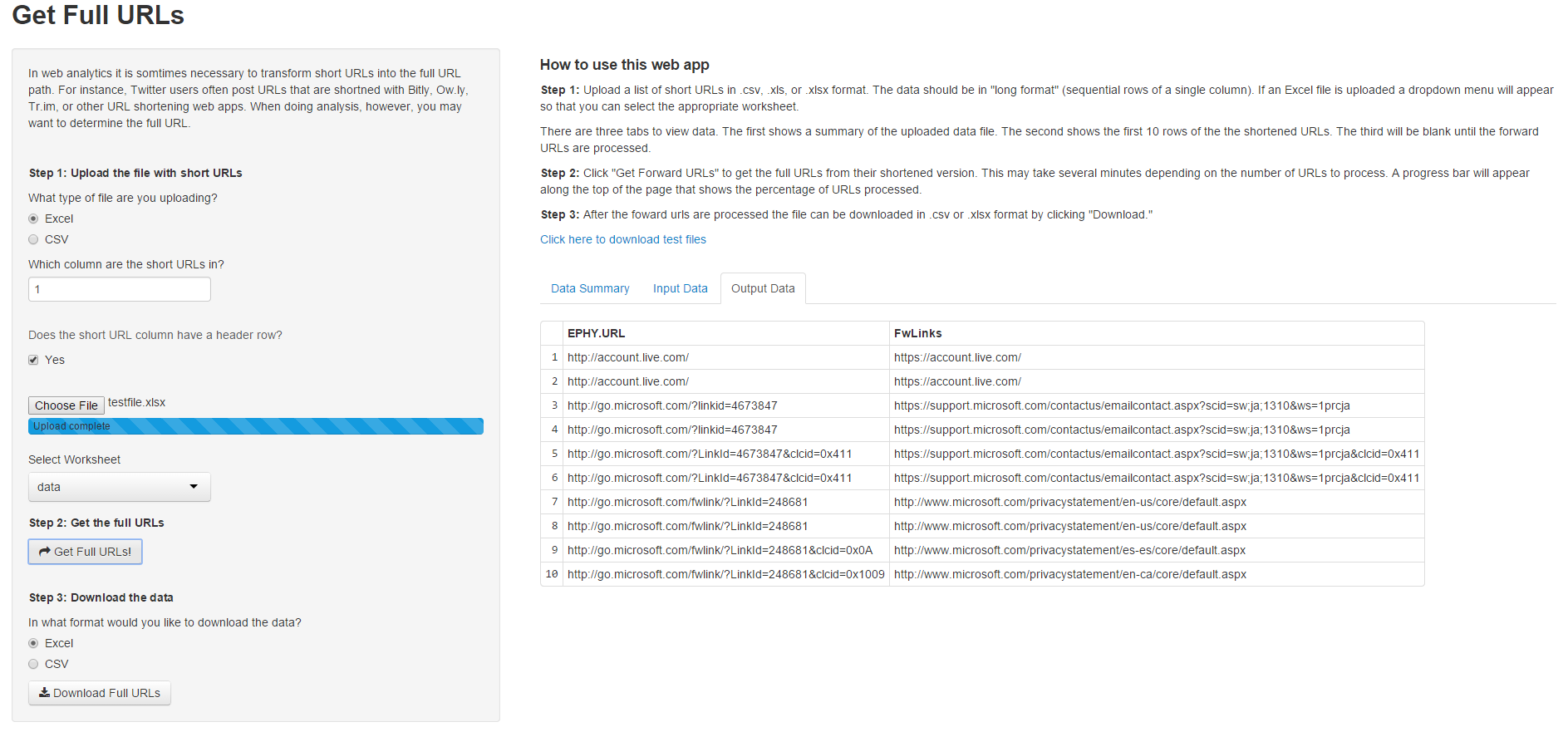
The web app allows input in .csv and Excel formats and also allows the user to export the full URLs in .csv and Excel formats. If an Excel file is used as input a drop down menu automatically appears so the user can select the appropriate worksheet. There is also a progress bar and error handling in case something goes wrong.
A Shiny web app is composed of two files: a user interface file – ui.R – and a server file – server.R. Shiny was recently updated to allow a single file to contain both functions, but I prefer keeping the files separate for clarity. There is a separate function (not shown here) I wrote in R to get the forward URLs.
ui.R is below.
require(shiny)

shinyUI(fluidPage(
  titlePanel("Get Full URLs"),

  tags$head(
    tags$style(HTML("
      .errortext {
        font-size: 1em;
        color: red;
        padding-top: 1em;
        padding-bottom: 1em;
      }
    "))
  ),

  sidebarLayout(
    sidebarPanel(
      p('In web analytics it is somtimes necessary to transform short URLs into the full
        URL path. For instance, Twitter users often post URLs that are shortned with
        Bitly, Ow.ly, Tr.im, or other URL shortening web apps. When doing analysis, however,
        you may want to determine the full URL.'), br(),


      h5('Step 1: Upload the file with short URLs'),
      radioButtons(inputId = 'inputformat',
                   label = 'What type of file are you uploading?',
                   choices = c('Excel' = 'excel', 'CSV' = 'csv')),
      numericInput(inputId = 'datacol',
                   label = 'Which column are the short URLs in?',
                   value = 1,
                   min = 1,
                   max = 10,
                   step = 1), br(), br(),
      helpText('Does the short URL column have a header row?'),
      checkboxInput(inputId = 'dataheader',label = 'Yes',value = TRUE), br(),
      fileInput(inputId = 'datafile', label = ''),
      uiOutput('worksheets'),

      h5('Step 2: Get the full URLs'),
      actionButton(inputId = "getlinks", label = "Get Full URLs!", icon = icon("mail-forward")), br(), br(),


      h5('Step 3: Download the data'),
      radioButtons(inputId = 'outputformat',
                   label = 'In what format would you like to download the data?',
                   choices = c('Excel' = 'excel', 'CSV' = 'csv')),
      downloadButton('downloadlinks','Download Full URLs')
      ),

    mainPanel(
      #textOutput('testing'),
      h4('How to use this web app'),
        p(strong('Step 1:'), 'Upload a list of short URLs in .csv, .xls, or .xlsx format.
          The data should be in "long format" (sequential rows of a single column).
          If an Excel file is uploaded a dropdown menu will appear so that you can
          select the appropriate worksheet.'),
        p('There are three tabs to view data. The first shows a summary of the
          uploaded data file. The second shows the first 10 rows of the the shortened URLs.
          The third will be blank until the forward URLs are processed.'),
        p(strong('Step 2:'), 'Click "Get Forward URLs" to get the full URLs from their shortened version.
          This may take several minutes depending on the number of URLs to process. A progress
          bar will appear along the top of the page that shows the percentage of URLs processed.'),
        p(strong('Step 3:'), 'After the foward urls are processed the file can be downloaded in .csv or .xlsx
          format by clicking "Download."'),
        a('Click here to download test files',
          href= 'https://www.dropbox.com/sh/tq2amcgfm7o99qi/AABrJVU4mNquOw-zmmRbRcaMa?dl=0',
          alt = 'Link to public Dropbox account with test files',
          target = '_blank'), br(), br(),

      uiOutput('errortext'),

      tabsetPanel(id = "datatabs",
                  tabPanel(title = "Data Summary", value = 'datasumtab', tableOutput('inputsum')),
                  tabPanel(title = "Input Data", value = 'inputdatatab', tableOutput('inputdata')),
                  tabPanel(title = "Output Data", value = 'outputdatatab', tableOutput('outputdata'))
      )
    )
  )
))
Created by Pretty R at inside-R.org
And here is server.R.
######################################################
# James McCammon
# 28 December 2014
# Get Full URLs function
# Version 4
######################################################

# Load libraries and source functions
require(shiny)
require(RCurl)
require(XML)
require(XLConnect)
source("functions.R")

# Define server instance
shinyServer(function(input, output, session) {

  # Initialize reactive values
  values = reactiveValues()

  # Function to get file path of uploaded file
  filepath = reactive({
    file = input$datafile
    if(is.null(file)) return()
    return(file$datapath)
  })

  # If the uploaded file is Excel create a dropdown menu so the user can select the
  # worksheet with the relevant data.
  observe({
    if(is.null(input$dynamicinput)) {
      if(input$inputformat == 'excel' & !is.null(filepath())) {
        possibleerror = try(values$workbook <- loadWorkbook(filepath()), silent = TRUE)
        if(class(possibleerror) == 'try-error') { seterror('excelloaderror'); return() }
        sheetNames = getSheets(values$workbook)
        output$worksheets = renderUI({
          selectInput(inputId = "dynamicinput",
                      label = "Select Worksheet",
                      choices = c(sheetNames,'Select' = 'select'),
                      selected = 'select')
        })
      }
    }
  })

  # Create a table with summary data of the file
  output$inputsum = renderTable({
    if(is.null(input$datafile)) return()
    return(input$datafile)
  })

  # Create a table with the first 10 rows of the input data
  output$inputdata = renderTable({
    if(is.null(input$datafile) | is.na(input$datacol)) return()
      clearerror()
      # Load the relvant data depending on the file type. If the specified file type doesn't
      # match the loaded file throw an error.
      inputdata = switch(input$inputformat,
                   'excel' = {
                     if(is.null(input$dynamicinput)) return()
                     if(input$inputformat == 'excel' & input$dynamicinput == 'select') return()
                     tryCatch({ readWorksheet(values$workbook, sheet = input$dynamicinput, header = input$dataheader)
                     }, error = function(e) { seterror('excelreaderror'); return() })
                   },
                   'csv' = {
                     tryCatch({ read.csv(file = filepath(), header = input$dataheader, stringsAsFactors = FALSE)
                     }, error = function(e) { seterror('csvloaderror'); return() })
                   })
      # Take the data and get out the first 10 rows. If there is an error it's likely because
      # the specified worksheet or data column has no data. Tell the user this if an error occurs.
      values$inputdata = inputdata
      possibleerror = try(inputdata <- inputdata[[input$datacol]], silent = TRUE)
      if(class(possibleerror) == 'try-error') { seterror('subscripterror'); return() }
      inputdata = as.data.frame(inputdata[1:10])
      names(inputdata)[1] = "short_url_preview"
      return(inputdata)
  })

  # When the users pushes the "Get Full URLs" button get the URLs by calling the getFWLinks function
  # found in Functions.R. If there is no inpupt data let the user know they forgot to load it.
  observe({
    input$getlinks
    if(input$getlinks == 0) return()
    else {
      updateTabsetPanel(session, inputId = "datatabs", selected = "outputdatatab")
      output$outputdata = renderTable({
      possibleerror = try(values$output <- isolate(getFwLinks(as.data.frame(values$inputdata), input$datacol)), silent = TRUE)
      if(class(possibleerror) == 'try-error') { seterror('nodataerror'); return() }
      return(as.data.frame(values$output[1:10,]))
      })
    }
  })

  # When the user selects "Download Full URLs" download them in the specified format.
  # Note the file.rename function is used to handle the temporary filepath created by Shiny.
  output$downloadlinks = downloadHandler(
    filename = function() {
      filename = switch(input$outputformat,
                        'excel' = 'Full_URLs.xlsx',
                        'csv' = 'Full_URLs.csv'
                        )
    },
    content = function(file) {
      if(input$outputformat == 'csv') {
        write.csv(values$output, 'temp.csv', row.names = FALSE)
        file.rename('temp.csv', file)
      }
      else {
        outputdata = loadWorkbook('temp.xlsx', create = TRUE)
        createSheet(object = outputdata, name = 'Full_URLs')
        writeWorksheet(outputdata, data = values$output, sheet = 'Full_URLs')
        saveWorkbook(outputdata, 'temp.xlsx')
        file.rename('temp.xlsx', file)
      }
    }
  )

  # Create a function to ouput various error messages
  seterror = function(error) {
    errormessage = switch(error,
                    'excelloaderror' =  'Error: There was an error loading the file.
                                         Are you sure it is an Excel file? Try changing
                                         your selection to CSV.',
                    'excelreaderror' =  'Error: The workbook loaded, but there was
                                         an error reading the specified worksheet',
                    'csvloaderror'   =  'Error: There was an error loading the file.
                                         Are you sure it is a csv file?',
                    'fullurlserror'  =  'Error: There was a problem getting the full URLs.
                                         Are you sure you selected the correct data column?',
                    'subscripterror' =  'Error: There does not seem to be any data there.',
                    'nodataerror'    =  'Error: Did you forget to upload data?')

    output$errortext = renderUI({
      tags$div(class = "errortext", checked = NA,
               tags$p(errormessage))
    })
  }

  # Define a function to clear error messages.
  clearerror = function() {
    output$errortext = renderUI({
      p('')
    })
  }
})
 James McCammon